100+ Blogging Terms Every Beginner Should Know (2026)
New to blogging? This comprehensive blogging glossary explains over 100 common blogging terms in simple English, helping you better understand SEO, content creation, monetization, and growing a successful blog.

Want a fast, beautiful blog without the tech stress? Ghost is the platform I personally use and recommend. Built for independent bloggers, it comes with everything you need and nothing you don't.
This blogging glossary is designed to be your go-to reference whenever you come across an unfamiliar word. Whether you're building your first blog, learning SEO, exploring affiliate marketing, or growing your audience, you'll find clear and beginner-friendly explanations here.
I've organized the terms alphabetically so you can quickly jump to the one you're looking for. As blogging continues to evolve, I'll also keep updating this glossary with new terms and concepts.
How to Use This Blogging Glossary
This glossary is organized from A to Z. Each term includes a simple explanation designed for beginners, so you don't need any technical knowledge to understand it.
A
Above the Fold
Above the fold refers to the portion of a webpage that visitors can see immediately after it loads without scrolling. Since it's the first thing people notice, many bloggers place their headline, featured image, or email signup form in this area.
Ad Network
An ad network connects website owners with advertisers who want to display ads on their websites. Bloggers use ad networks to earn money whenever visitors view or click advertisements.
Examples include Google AdSense, TinyAdz and Paved.
Affiliate Link
An affiliate link is a special tracking link provided by a company. When someone clicks the link and makes a purchase, you earn a commission without increasing the customer's price.
Affiliate links are one of the most popular ways bloggers make money.
Affiliate Marketing
Affiliate marketing is the process of promoting another company's products or services in exchange for a commission whenever someone purchases through your affiliate link.
For many bloggers, affiliate marketing becomes their primary source of income.
Alt Text
Alt text (alternative text) is a written description added to an image. It helps search engines understand what the image contains while also improving accessibility for visitors using screen readers.
Adding descriptive alt text is considered a good SEO practice.
Analytics
Analytics refers to the data collected about your website visitors. It helps you understand how people find your blog, which pages receive the most traffic, how long visitors stay, and what actions they take.
Popular analytics tools include Google Analytics and Simple Analytics.
Anchor Text
Anchor text is the clickable word or phrase used in a hyperlink.
For example, instead of displaying a long URL, you might write "SEO checklist", which becomes the clickable text leading readers to another page.
Well-written anchor text improves both user experience and SEO.
Authority Site
An authority site is a website that consistently publishes high-quality content within a specific niche and earns trust from both readers and search engines.
Authority sites often rank well because they demonstrate expertise and reliability.
Autoresponder
An autoresponder is an automated email that's sent after someone joins your email list or completes a specific action.
Many bloggers use autoresponders to welcome new subscribers or deliver free resources automatically.
B
Backlink
A backlink is a link from another website pointing to your blog.
Search engine's view quality backlinks as votes of confidence, making them one of the most important ranking factors in SEO.
Blog
A blog is a website or section of a website where articles are published regularly. Blogs can focus on personal experiences, education, business, finance, travel, food, technology, or virtually any topic.
Blog Category
Categories help organize blog posts into broad topics.
For example, a blogging website might have categories like Blogging Tips, SEO, WordPress, and Affiliate Marketing.
Categories make it easier for visitors to browse related content.
Blog Niche
A blog niche is the primary topic your website focuses on. Examples include personal finance, fitness, travel, parenting, beauty, technology, and blogging.
Choosing a niche helps attract a more targeted audience.
Blog Post
A blog post is an individual article published on your blog.
Each post usually focuses on one topic and can include text, images, videos, tables, or downloadable resources.
Bounce Rate
Bounce rate measures the percentage of visitors who leave your website after viewing only one page.
A high bounce rate isn't always bad, but encouraging readers to explore additional articles often improves engagement.
Branding
Branding refers to how your blog is presented to readers.
It includes your logo, colors, typography, writing style, voice, and the overall experience visitors have when interacting with your website. A strong branding helps your blog become more memorable.
Breadcrumbs
Breadcrumbs are navigation links that show visitors where they are within your website.
For example: Home → Blogging → SEO → Keyword Research
They improve navigation and can also help search engines better understand your site's structure.
Broken Link
A broken link is a hyperlink that no longer works because the destination page has been deleted, moved, or no longer exists.
Regularly checking for broken links helps maintain a positive user experience.
Buyer Intent
Buyer intent describes how likely someone is to make a purchase based on their search.
For example, someone searching for "Best email marketing software for bloggers" usually has stronger buying intent than someone searching "What is email marketing?"
Understanding buyer intent helps bloggers create content that converts better.
C
Call-to-Action (CTA)
A call-to-action is a sentence, button, or link encouraging readers to take a specific action.
Examples include:
Every blog post should include at least one clear CTA.
Canonical URL
A canonical URL tells search engines which version of a webpage should be treated as the original when similar pages exist. It helps prevent duplicate content issues.
CMS (Content Management System)
A Content Management System, commonly called a CMS, is software used to create and manage websites without coding.
Popular CMS platform include Ghost CMS.
Content Calendar
A content calendar is a publishing schedule that helps bloggers plan articles in advance.
Using a content calendar improves consistency and prevents running out of ideas.
Content Cluster
A content cluster is a group of related articles centered around one main topic.
For example:
Main guide:
How to Start a Finance Blog on WordPress.com (Beginner’s Guide).
Supporting articles:
- What Are Plugins? and How to Install and Use Them on Your WordPress.com Blog
- How to Monetize Your WordPress.com Blog with Paid Content Subscriptions (Beginner Guide)
- How to Set a Custom Homepage on WordPress.com and Enable Coming Soon Mode (Beginner Guide)
Content clusters help improve SEO and make your website easier to navigate.
Content Marketing
Content marketing is the strategy of attracting readers by publishing helpful, educational, or entertaining content rather than directly advertising products.
Blogging is one of the most popular forms of content marketing.
Conversion
A conversion happens whenever a visitor completes a desired action.
Examples include:
- Joining your email list
- Purchasing a product
- Clicking an affiliate link
- Downloading a free resource
Conversions are one of the most important measurements for bloggers focused on growing a business.
Conversion Rate
Conversion rate measures the percentage of visitors who complete a desired action.
For example, if 100 people visit your blog and 10 subscribe to your newsletter, your conversion rate is 10%.
Copyright
Copyright is the legal protection given to original creative work, including blog posts, photographs, graphics, and videos.
Using someone else's content without permission may violate copyright laws.
Crawl
Crawling is the process search engines use to discover new webpages.
Search engine bots regularly crawl websites to find new content before adding it to search results.
D
Dashboard
The dashboard is the main control panel of your blogging platform. It's where you manage your posts, pages, comments, themes, plugins, analytics, and website settings.
Digital Product
A digital product is something customers can purchase and download online.
Popular digital products for bloggers include eBooks, templates, planners, online courses, checklists, Notion templates, spreadsheets, and printables.
Unlike physical products, digital products don't require shipping or inventory.
Read:
Domain Name
A domain name is your website's address on the internet. For example: my website domain name is thesoloblogger.com.
Domain Registrar
A domain registrar is a company that allows you to purchase and manage domain names.
A popular registrar is Namecheap. That is where I purchase all my domains.
Domain Authority (DA)
Domain Authority (DA) is a score that estimates how likely a website is to rank in search engines. The score ranges from 1 to 100, with higher scores generally indicating stronger authority.
While Google doesn't use Domain Authority as a ranking factor, many bloggers use it to compare websites.
Duplicate Content
Duplicate content refers to identical or very similar content appearing on multiple webpages.
Search engines may struggle to determine which version should rank, so it's generally best to publish original content whenever possible.
E
Earnings Per Click (EPC)
Earnings Per Click measures how much affiliates earn on average for each click sent through an affiliate link.
Affiliate marketers often compare EPC when deciding which affiliate programs to promote.
Editorial Calendar
An editorial calendar is a schedule that organizes upcoming blog posts, publication dates, target keywords, and promotional activities.
Planning content ahead of time helps bloggers publish more consistently.
Email List
An email list is a collection of subscribers who have given you permission to send them emails.
Unlike social media followers, your email list is an audience you own, making it one of the most valuable assets a blogger can build.
Email Marketing
Email marketing involves sending newsletters, updates, promotions, or educational content directly to your subscribers.
Many bloggers use email marketing to build relationships, increase traffic, and generate sales.
Engagement
Engagement refers to how visitors interact with your content.
Examples include comments, social shares, email replies, clicks, and the amount of time readers spend on your website.
High engagement usually signals that your content is valuable.
Evergreen Content
Evergreen content remains useful and relevant long after it's published.
Examples include beginner tutorials, how-to guides, glossaries, and educational articles that don't become outdated quickly.
External Link
An external link points from your website to another website. Using reputable external sources can improve your content's credibility.
F
Featured Image
A featured image is the main image associated with a blog post. It's typically displayed on your homepage, blog archive, search results, and social media previews.
A strong featured image can improve click-through rates. I personally design all my featured image with Canva.
Focus Keyword
A focus keyword is the primary search term you want a blog post to rank for in search engines.
Everything from your title to headings, meta description, and content should naturally support that keyword.
Footer
The footer is the section located at the bottom of your website.
It often includes navigation links, copyright information, contact details, newsletter signup forms, and social media icons.
Funnel
A funnel describes the journey visitors take before completing a desired action, such as subscribing to your newsletter or purchasing a product.
For example:
Blog Post → Email Signup → Welcome Email → Product Recommendation.
Funnels help bloggers turn readers into customers.
G
Google Analytics
Google Analytics is a free analytics platform that tracks your website traffic.
It provides insights into visitor behavior, traffic sources, page views, conversions, and much more. You can use it to understand which content performs best.
Blogging platforms like Ghost and Feather has built-in analytics.
Google Search Console
Google Search Console is a free tool from Google that helps website owners monitor their performance in Google Search.
It allows you to submit sitemaps, monitor keyword rankings, identify indexing issues, and see which search queries bring visitors to your blog.
Guest Post
A guest post is an article written for another person's website.
Guest posting helps bloggers build backlinks, reach new audiences, and establish authority within their niche.
Guest Blogging
Guest blogging is the practice of regularly contributing articles to other blogs.
Besides building relationships within your industry, guest blogging can also improve your website's SEO through high-quality backlinks.
H
Heading Tags
Heading tags organize your content into sections.
The most common heading levels include:
- H1 — Main title
- H2 — Main sections
- H3 — Subsections
- H4–H6 — Additional levels of organization
Using headings improves readability for both visitors and search engines.
Homepage
A homepage is the main page visitors see when they enter your website.
Depending on your blogging platform, your homepage can display your latest blog posts, a custom landing page, or a business homepage.
Hosting
Hosting is the service that stores your website's files and makes them available online. Without hosting, your website cannot be accessed through the internet.
Platforms, like Ghost(Pro), and Hyvor Blogs, include hosting as part of their service.
HTML
HTML (HyperText Markup Language) is the standard language used to structure webpages.
Although most bloggers never need to write HTML manually, understanding basic HTML can be useful when customizing blog posts or embedding content.
Hyperlink
A hyperlink is clickable text or an image that takes visitors to another webpage when selected.
Hyperlinks are essential for navigation and are commonly used for internal links, external links, and affiliate links.
HTTPS
HTTPS (HyperText Transfer Protocol Secure) is the secure version of HTTP.
Websites using HTTPS encrypt data exchanged between visitors and the website, improving both security and trust.
Modern websites should always use HTTPS, and search engines generally favor secure websites over unsecured ones.
I
Indexing
Indexing is the process of adding your webpages to a search engine's database after they've been crawled. Once a page is indexed, it becomes eligible to appear in search results.
Internal Link
An internal link connects one page on your website to another page on the same website.
Internal linking helps visitors discover related content while also helping search engines understand your site's structure.
J
JSON-LD
JSON-LD (JavaScript Object Notation for Linked Data) is a format used to add structured data to webpages. It helps search engines understand your content and may improve how your pages appear in search results.
K
Keyword
A keyword is the word or phrase people type into search engines when looking for information.
For example, "how to start a blog" is a keyword someone might search before reading a tutorial.
Keyword Difficulty
Keyword difficulty estimates how challenging it may be to rank for a particular keyword. Highly competitive keywords usually require more authority and stronger backlinks than lower-difficulty keywords.
Keyword Research
Keyword research is the process of finding words and phrases your audience is searching for.
It helps bloggers create content that matches user intent and improves their chances of ranking in search engines.
Keyword Cannibalization
Keyword cannibalization happens when multiple pages on your website target the same keyword, causing them to compete against each other in search results.
Creating one comprehensive article is better than publishing several similar posts.
L
Landing Page
A landing page is a standalone webpage designed to encourage visitors to take a specific action, such as subscribing to a newsletter, downloading a free resource, or purchasing a product.
Lead Magnet
A lead magnet is a free resource offered in exchange for a visitor's email address. Lead magnets are one of the most effective ways to grow an email list.
Long-Tail Keyword
A long-tail keyword is a more specific search phrase that usually contains three or more words.
For example, "best blogging platform for personal finance bloggers" is a long-tail keyword.
Although these keywords often have lower search volume, they can be easier to rank for and attract more targeted visitors.
M
Meta Description
A meta description is the short summary displayed beneath your page title in search engine results.
While it isn't a direct ranking factor, a compelling meta description can encourage more people to click on your article.
Meta Title
A meta title is the title displayed in search engine results and browser tabs. Your meta title should accurately describe your webpage while encouraging users to click.
Monetization
Monetization is the process of earning money from your blog.
Common monetization methods include affiliate marketing, display advertising, sponsored posts, memberships, digital products, online courses, and consulting.
N
Niche
A niche is the primary topic or industry your blog focuses on. Examples include blogging, personal finance, fitness, food, travel, beauty, and technology.
Choosing a clear niche helps attract a more targeted audience.
Newsletter
A newsletter is a recurring email sent to subscribers. Bloggers use newsletters to share new articles, updates, promotions, recommendations, and exclusive content.
Best newsletter platforms include Kit, Beehiiv, GetResponse etc.
Nofollow Link
A nofollow link tells search engines not to pass ranking value from one website to another.
These links are commonly used for sponsored content, advertisements, and certain affiliate links.
O
Off-Page SEO
Off-page SEO refers to activities that improve your website's authority outside your own site.
Examples include earning backlinks, guest posting, digital PR, and social media promotion.
On-Page SEO
On-page SEO involves optimizing elements within your own website.
This includes improving titles, headings, keywords, internal links, image optimization, URLs, and overall content quality.
Organic Traffic
Organic traffic refers to visitors who find your website through unpaid search engine results. Unlike paid advertising, organic traffic is earned by publishing valuable, optimized content.
Outbound Link
An outbound link is a hyperlink pointing from your website to another website. Linking to trustworthy sources can improve the credibility of your content.
P
Page Builder
A page builder is a visual design tool that allows you to create webpages without writing code.
Popular examples include Elementor.
Page builders use drag-and-drop editing to simplify website design.
Page Speed
Page speed measures how quickly a webpage loads for visitors. Fast-loading websites generally provide a better user experience and may perform better in search engines.
You can make use of free tools like PageSpeend insights to see how fast your website loads and perform on search insights.
Page View
A page view is recorded each time someone loads a webpage. If one visitor opens three different blog posts, that counts as three page views.
Pillar Content
Pillar content is a comprehensive article that covers a broad topic in depth. It acts as the main resource for a subject and links to several supporting articles.
For example, a pillar guide on SEO for Bloggers could link to articles about keyword research, internal linking, meta descriptions, and image optimization.
Plugin
A plugin is a software extension that adds new features to your website without requiring custom coding.
For example, plugins can help with SEO, contact forms, backups, eCommerce, security, and analytics.
Permalink
A permalink is the permanent URL of a webpage or blog post.
For example: https://www.example.com/blogging-glossary
Using short, descriptive permalinks improves readability and SEO.
Personal Blog
A personal blog is a website where an individual shares knowledge, experiences, opinions, or interests.
Today's personal blogs often cover topics such as personal finance, productivity, business, travel, health, or hobbies rather than simply acting as online diaries.
PPC (Pay-Per-Click)
PPC is an advertising model where advertisers pay each time someone clicks their advertisement.
Google Ads is one of the most popular PPC advertising platforms.
Publishing Schedule
A publishing schedule is a planned timetable for releasing new content.
Whether you publish weekly or monthly, maintaining a consistent schedule helps readers know when to expect new articles and can improve your long-term blogging habits.
Q
Query
A query is the word or phrase someone enters into a search engine when looking for information.
For example, "how to start a personal blog" is a search query. Understanding the queries your audience uses helps you create content that answers their questions.
R
Ranking
Ranking refers to the position of your webpage in search engine results for a particular keyword.
For example, if your article appears as the third result on Google for "best blogging platforms," it ranks in position three for that keyword.
Rank Tracking
Rank tracking is the process of monitoring where your webpages appear in search engine results over time.
Many SEO tools allow bloggers to track keyword rankings and see whether their content is moving up or down.
Redirect
A redirect automatically sends visitors from one URL to another.
Redirects are commonly used after changing URLs, deleting pages, or moving content to prevent visitors from encountering broken links.
Responsive Design
Responsive design ensures that your website automatically adjusts to different screen sizes, including desktops, tablets, and smartphones.
A responsive website provides a better user experience across all devices.
Rich Snippets
Rich snippets are enhanced search results that display additional information such as ratings, FAQs, recipes, prices, or product details.
They often attract more attention and can improve click-through rates.
Robots.txt
A robots.txt file tells search engine crawlers which parts of your website they can or cannot access.
Website owners use this file to manage how search engines crawl their content.
S
Schema Markup
Schema markup is structured data added to your website to help search engines better understand your content.
It can increase your chances of earning rich snippets in search results.
Search Engine
A search engine is a website that helps users find information online.
Google, Bing, and DuckDuckGo are popular search engines.
Search Engine Optimization (SEO)
SEO is the practice of improving your website so it can rank higher in search engine results and attract more organic traffic.
Good SEO involves creating valuable content, optimizing keywords, improving website performance, and earning quality backlinks.
Search Intent
Search intent refers to the reason behind a user's search.
For example, someone searching "what is affiliate marketing" wants information, while someone searching "best affiliate marketing course" may be ready to make a purchase.
Understanding search intent helps bloggers create content that satisfies readers.
SERP (Search Engine Results Page)
A SERP is the page displayed after someone performs a search on a search engine.
Your goal as a blogger is to rank as high as possible on the SERP for your target keywords.
Slug
A slug is the final part of a webpage's URL.
For example, in: example.com/blogging-glossary
the slug is: blogging-glossary
Short, descriptive slugs are generally better for both users and SEO.
Sitemap
A sitemap is a file that lists the important pages on your website, helping search engines discover and index your content more efficiently.
Most blogging platforms automatically generate XML sitemaps.
Sponsored Post
A sponsored post is an article created in partnership with a company that pays the blogger to feature its products or services.
Sponsored content should always be disclosed to readers.
T
Taxonomy
A taxonomy is the system used to organize content on your website.
Categories and tags are examples of taxonomies that help readers and search engines navigate your content.
Theme
A theme controls the appearance and layout of your blog.
Changing your blog theme can dramatically alter your website's design without affecting your content.
Traffic
Traffic refers to the number of people visiting your website.
Traffic can come from search engines, social media, email newsletters, referrals, or direct visits.
U
URL (Uniform Resource Locator)
A URL is the web address of a specific webpage.
For example: https://www.thesoloblogger.com
Every blog post and page has its own unique URL.
User Experience (UX)
User experience refers to how easy and enjoyable it is for visitors to use your website.
Fast loading speeds, clear navigation, readable fonts, and mobile-friendly designs all contribute to a better user experience.
V
Visitor
A visitor is anyone who accesses your website.
Depending on your analytics platform, visitors may be counted as unique users or total visits.
W
Web Hosting
Web hosting is the service that stores your website's files and makes them accessible on the internet.
Some blogging platforms include hosting as part of their plans, while others require you to purchase hosting separately.
Word Count
Word count refers to the total number of words in an article.
Longer articles aren't always better, but comprehensive content often performs well when it thoroughly answers a reader's question.
X
XML Sitemap
An XML sitemap is a special file that lists the pages on your website for search engines.
It helps Google and other search engines discover new and updated content more efficiently.
Y
Yoast SEO
Yoast SEO is a popular WordPress plugin that helps bloggers optimize their content for search engines.
It provides recommendations for titles, meta descriptions, readability, internal links, and other SEO improvements.
Z
Zero-Click Search
A zero-click search happens when Google answers a user's question directly on the search results page, meaning the user doesn't need to click through to a website.
Examples include featured snippets, weather forecasts, definitions, and calculator results.
To Wrap Things Up
Learning the language of blogging is one of the first steps toward becoming a confident blogger. While some of these terms may seem technical at first, you'll quickly become familiar with them as you publish more content, improve your SEO, and grow your website.
Hi, I'm Faye is the founder of The Solo Blogger, where I helps beginners start, grow, and monetize their blogs through practical tutorials, honest software reviews, SEO guides, and blogging resources. I enjoy testing blogging tools and simplifying complex topics so anyone can build a successful blog with confidence.
Frequently Asked Questions
What is a blogging glossary?
A blogging glossary is a collection of blogging-related terms and their definitions. It's designed to help beginners understand common words and phrases used in blogging, SEO, affiliate marketing, and website management.
Why should beginner bloggers learn these terms?
Understanding blogging terminology makes it much easier to follow tutorials, optimize your website, communicate with other bloggers, and make informed decisions as your blog grows.
What's the difference between a blog and a website?
A website is a broad term for any collection of web pages. A blog is a type of website that regularly publishes articles or posts, usually in chronological order.
What are the most important blogging terms to learn first?
If you're just starting, focus on understanding SEO, keywords, backlinks, internal links, domain names, hosting, affiliate marketing, and content management systems (CMS). These concepts form the foundation of successful blogging.
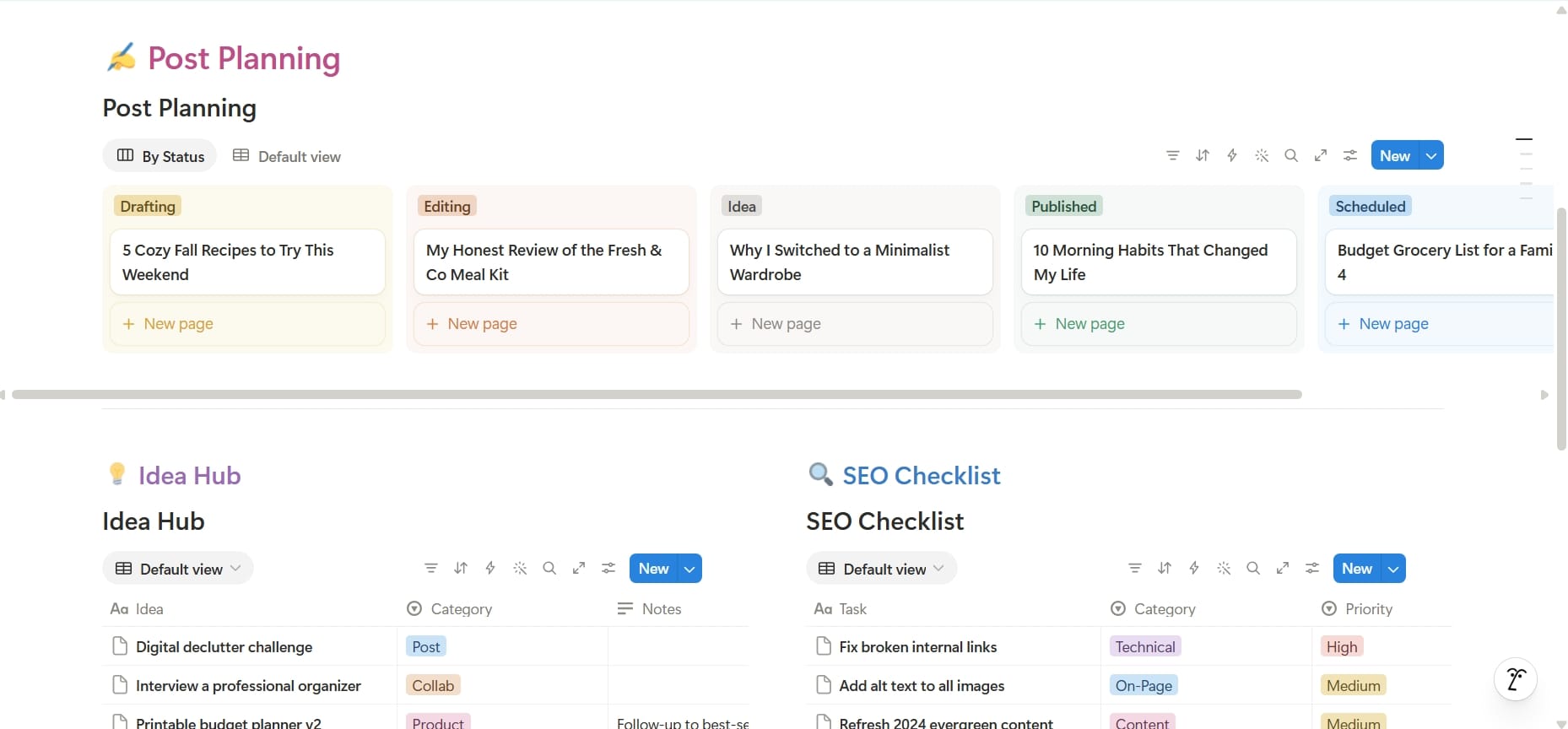
Blogger Business OS
Run your entire blogging business from one organized Notion workspace.
What's inside?
- Content and post planning
- Blog idea hub
- Affiliate link manager
- SaaS subscription tracker
- Business expense tracker
- Sponsorship management
- Product tracker
- Lead management
- Guest post management
- Tasks and milestones
- SEO checklist
- Blogging niches library and idea bank
- Landing page management
- Blog website landing page
- Important websites database
- Blogging business plan
- Business calendar
- Improvement tracker
- Employee database
- Website and site manager
- Recommendations and resources for readers
Whether you're starting your first blog or already running multiple websites, this template gives you a central place to organize the business side of blogging.
Plan better. Stay organized. Spend less time searching for information and more time growing your blog.
You might also like
12 Beautiful Blog Website Themes for New Bloggers (2026)
A great blog theme does more than make your website look beautiful—it helps build trust, strengthen your brand, and improve the reader experience. Here are 12 of the best blog website themes for new bloggers across Ghost, Beehiiv, WordPress.com, and Hyvor Blogs.
What Is a Blog and How to Start a Blog (Beginner’s Complete Guide)
Everything you need to start a blog from scratch, what a blog is, how it works, and the exact steps to launch yours today, even with zero experience.
What Can You Get From WordCamp US 2026? Is It Worth It for WordPress Bloggers?
Wondering if WordCamp US 2026 is worth attending as a WordPress.com blogger? Discover what you can learn, who should attend, whether the $100 ticket is worth the investment, and why this event could help you grow your blog and connect with the WordPress community.