How to Monetize Your WordPress.com Blog with Paid Content Subscriptions (Beginner Guide)
WordPress.com lets bloggers monetize content with built-in paid subscriptions, even on the free plan. Learn how it works, platform fees, WooCommerce alternatives, and how to start earning recurring income.


If you’ve been following along with my recent WordPress.com blog series, then by now we’ve already covered quite a lot.
I talked about how to start a finance blog on WordPress.com. I talked about plugins, what they do, and how they help expand your website as your blog grows.
But now we need to talk about something every blogger eventually starts asking.
How exactly do you make money from your blog?
Let’s be honest. A lot of people start blogging because they want freedom. Some may want to build a side income, while others may want to create a full-time business.
And this is where I think WordPress.com is surprisingly underrated. Most people see WordPress.com as a simple website builder for beginners.
What many people don’t realize is that WordPress.com actually includes built-in monetization tools (without needing plugins) that allow bloggers to start charging readers directly for premium content and to accept donations.
You do not need complicated membership plugins. WordPress.com already built the monetization system directly into the platform.
If your goal is building a blog that eventually becomes a real business, understanding paid subscriptions is extremely important.
In this guide, I want to walk you through exactly how WordPress.com paid content works, who should use it, what fees the platform charges, and how you can start monetizing your blog properly from day one.
First, What Is Paid Content Subscription?
The easiest way to understand paid subscriptions is to think about platforms like Substack.
Some newsletters publish free content, but certain premium newsletters charge monthly subscriptions. Only paying subscribers get access to exclusive content.
WordPress.com allows bloggers to do something very similar. You can choose to lock some of your content behind a paywall, while regular visitors can still access your free content.
Instead of depending entirely on ads or affiliate commissions, readers can directly pay you for your expertise, completely changing the economics of blogging.
Instead of building a website that only makes money through traffic, you begin building a website that earns from value. And honestly, I think this is one of the smartest monetization models available today.
Why Paid Subscriptions Are Important for Bloggers
Let me say something that beginner bloggers need to hear. Advertising is not always the best monetization strategy.
You may constantly hear stories like: "I made $10,000 from display ads.", "My website gets millions of monthly visitors.", "Google traffic changed my life."
And while all of that sounds great, there is a hidden problem.
- Traffic-dependent businesses are fragile.
- Google changes algorithms constantly.
- Advertising rates fluctuate.
- Search rankings disappear overnight.
And suddenly income disappears too. Now compare that to a subscription business.
Let’s imagine you have only 200 loyal readers, not millions, not hundreds of thousands, just 200 people. If those 200 readers each pay you $8 per month, that becomes: $1,600 every single month.
This is why paid subscriptions are becoming increasingly important.
The Interesting Part: WordPress.com Supports Paid Content on Every Plan
Even on WordPress.com free plan, paid subscription is supported. But there is one important thing you need to understand. WordPress.com charges platform fees depending on your plan.
The cheaper the plan, the higher the fee.
Here is how it works.
| WordPress.com Plan | Transaction Fee |
|---|---|
| Free Plan ($0) | 10% |
| Personal Plan ($48/year billed yearly) | 8% |
| Premium Plan ($96/year billed yearly) | 4% |
| Business Plan ($300/year billed yearly) | 2% |
| Commerce Plan ($540/year billed yearly) | 0% |
The free plan allows you to start monetizing immediately. But WordPress.com takes a larger percentage fee. As you upgrade, those fees gradually decrease.
And eventually on the Commerce plan, WordPress.com takes nothing.
This fee structure actually makes sense. They allow beginners to start small while rewarding creators building serious businesses.
Let’s Use a Real Blogging Example
Since this entire blog series has focused on building our finance blog on WordPress.com, let’s continue using the same example.
Imagine you run a finance blog teaching people how to manage money.
You publish free articles like:
- How to save money monthly
- Best budgeting methods
- Credit card mistakes beginners make
- Investing for beginners
- How to build an emergency fund
This free content helps attract traffic.
Now imagine creating premium content alongside it.
Subscriber-only resources like:
- Personal budgeting spreadsheets
- Premium investment guides
- Monthly stock market breakdowns
- Detailed savings calculators
- Private finance newsletter
- Premium debt repayment systems
Now readers can pay monthly to unlock premium content. Your blog becomes a membership business. This same model works in almost every niche.
How WordPress.com Paid Content Actually Works
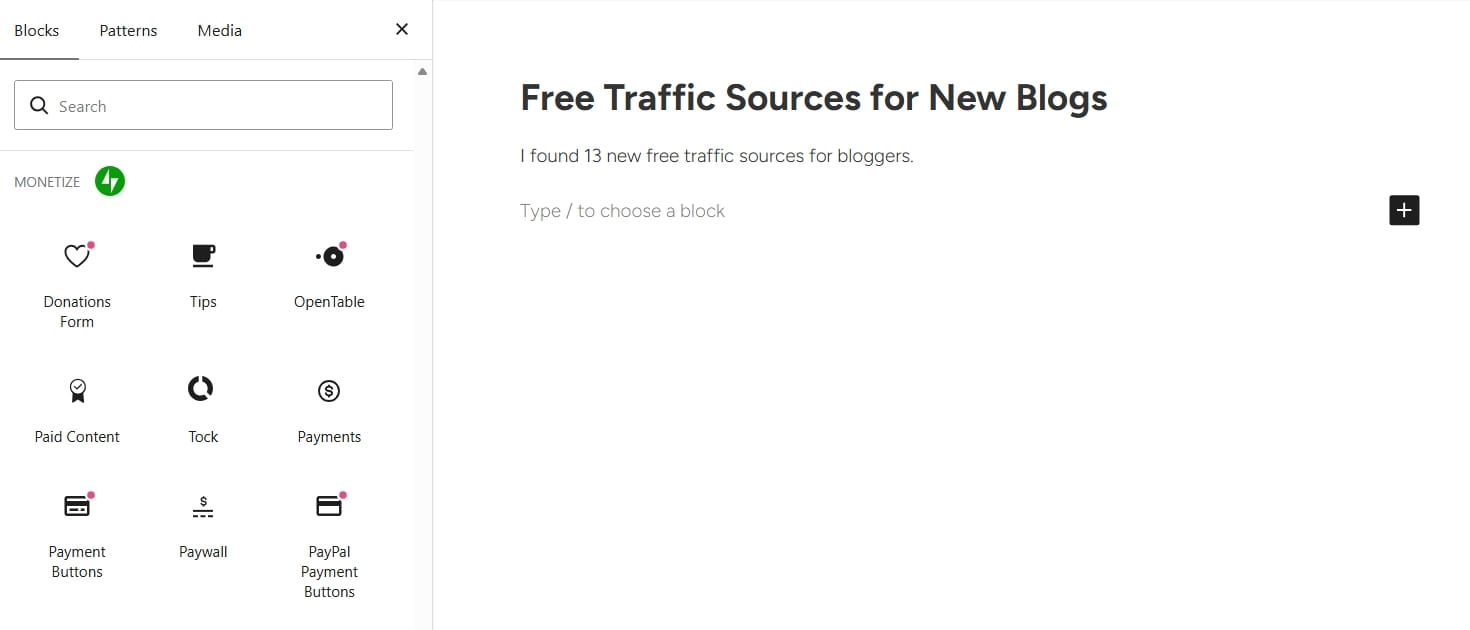
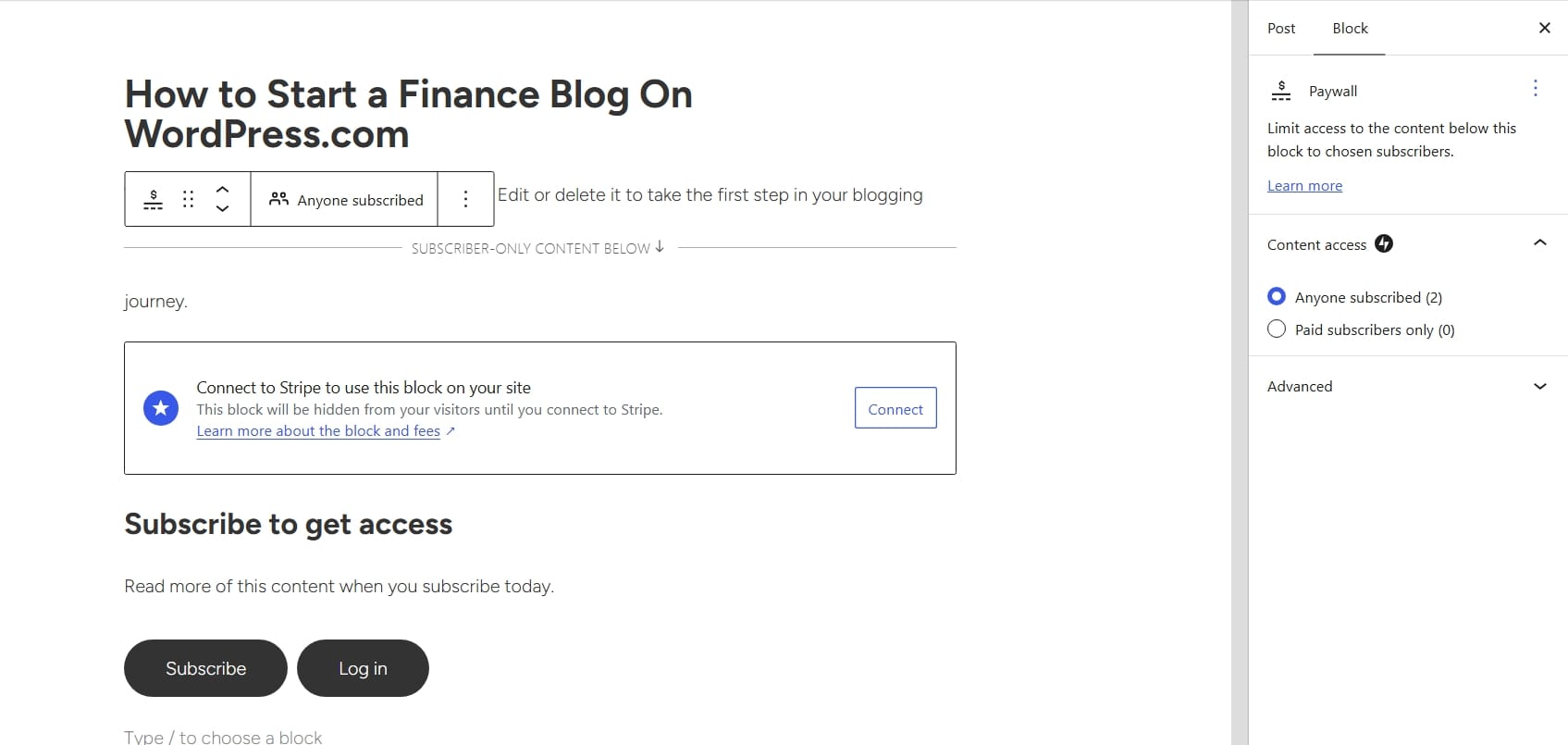
WordPress.com has a built-in feature called Paid Content Block. This block allows you to restrict specific content inside your posts. So, instead of locking entire pages, you can lock only certain sections.
For example: You write a public blog post called: 10 Ways to Save Money Every Month
The first half of the article remains free, then halfway through the post you place a paywall.
Below the paywall you include:
- Premium savings spreadsheet
- Advanced money management strategy
- Private subscriber resources
Only paying subscribers can continue reading. This is incredibly powerful because readers get a taste of your expertise before deciding to become a paid subscriber.
How To Set Up Paid Content on WordPress.com
The process is actually very simple.
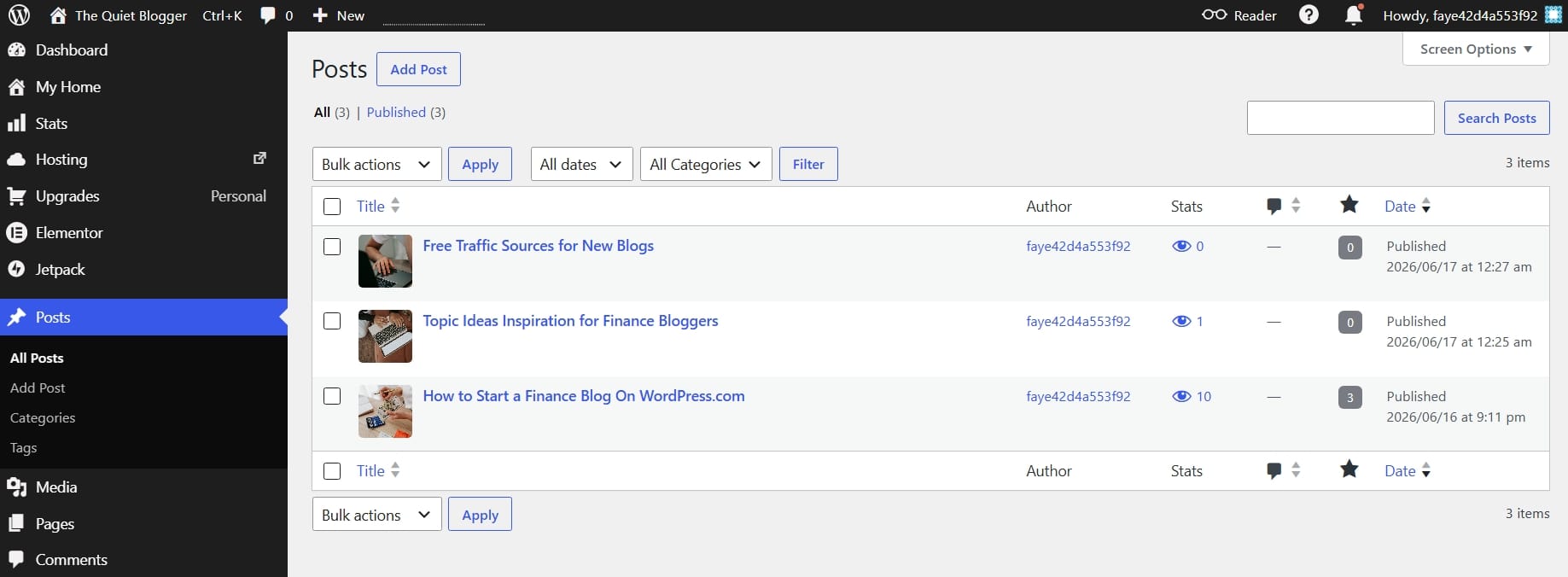
Inside your WordPress.com dashboard under your post section, you can create a new post. I already have a few posts, so I won't be creating a new one.
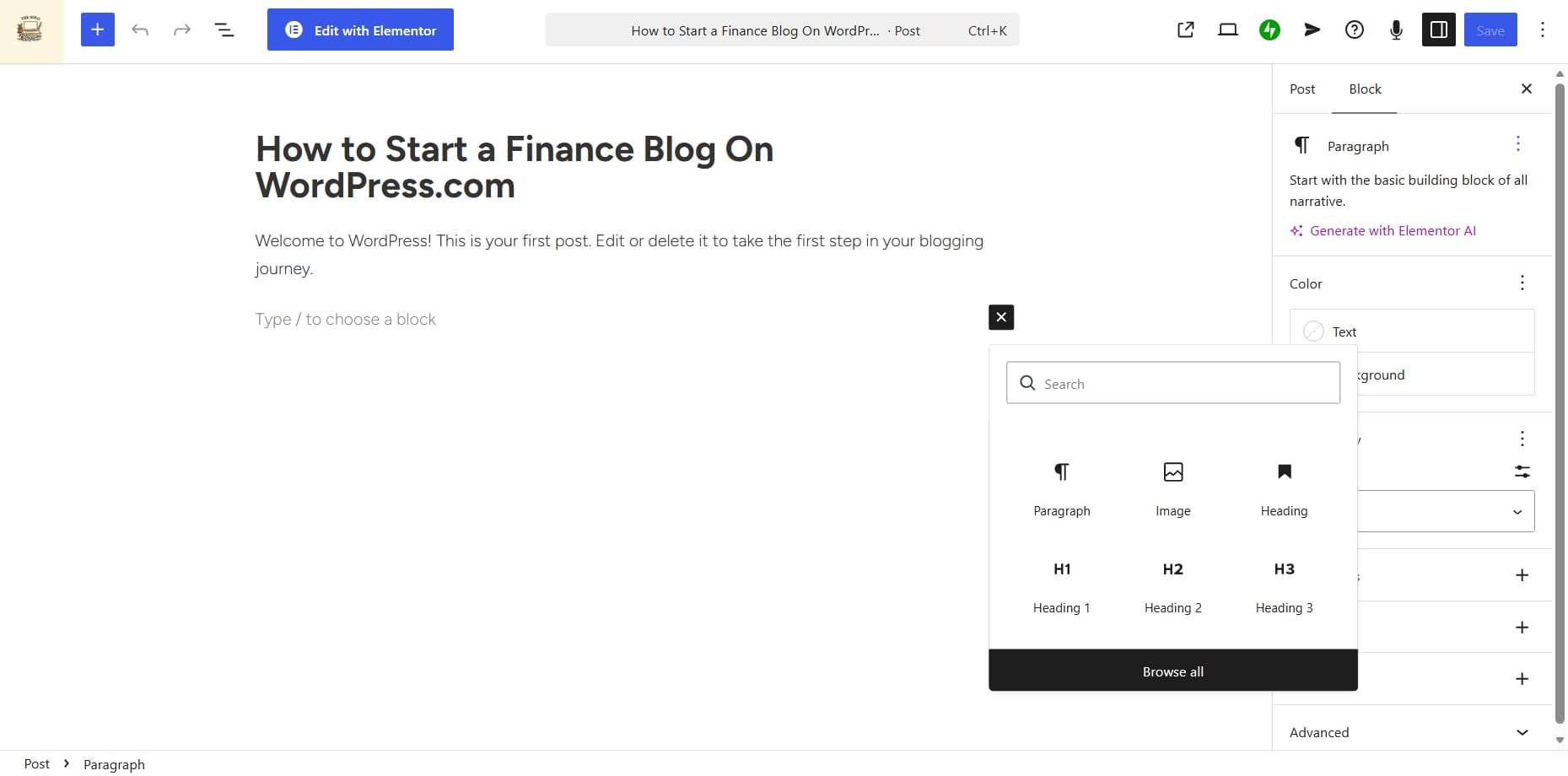
Once you're inside the editor, click the Add Block button, it's usually a plus sign.
Search for: Paid Content
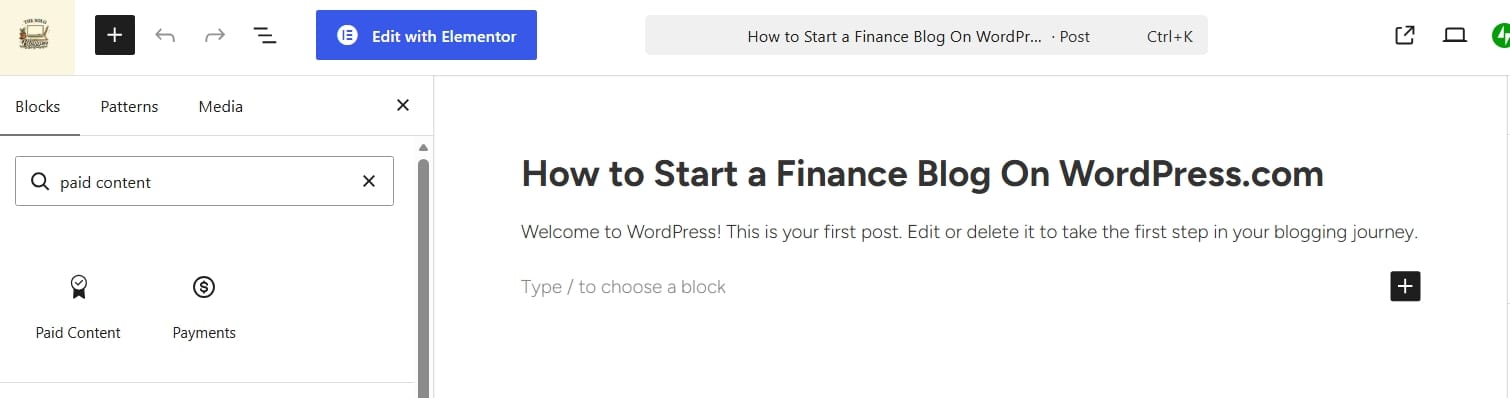
Now, you can insert the Paid Content block wherever you want premium content to begin.
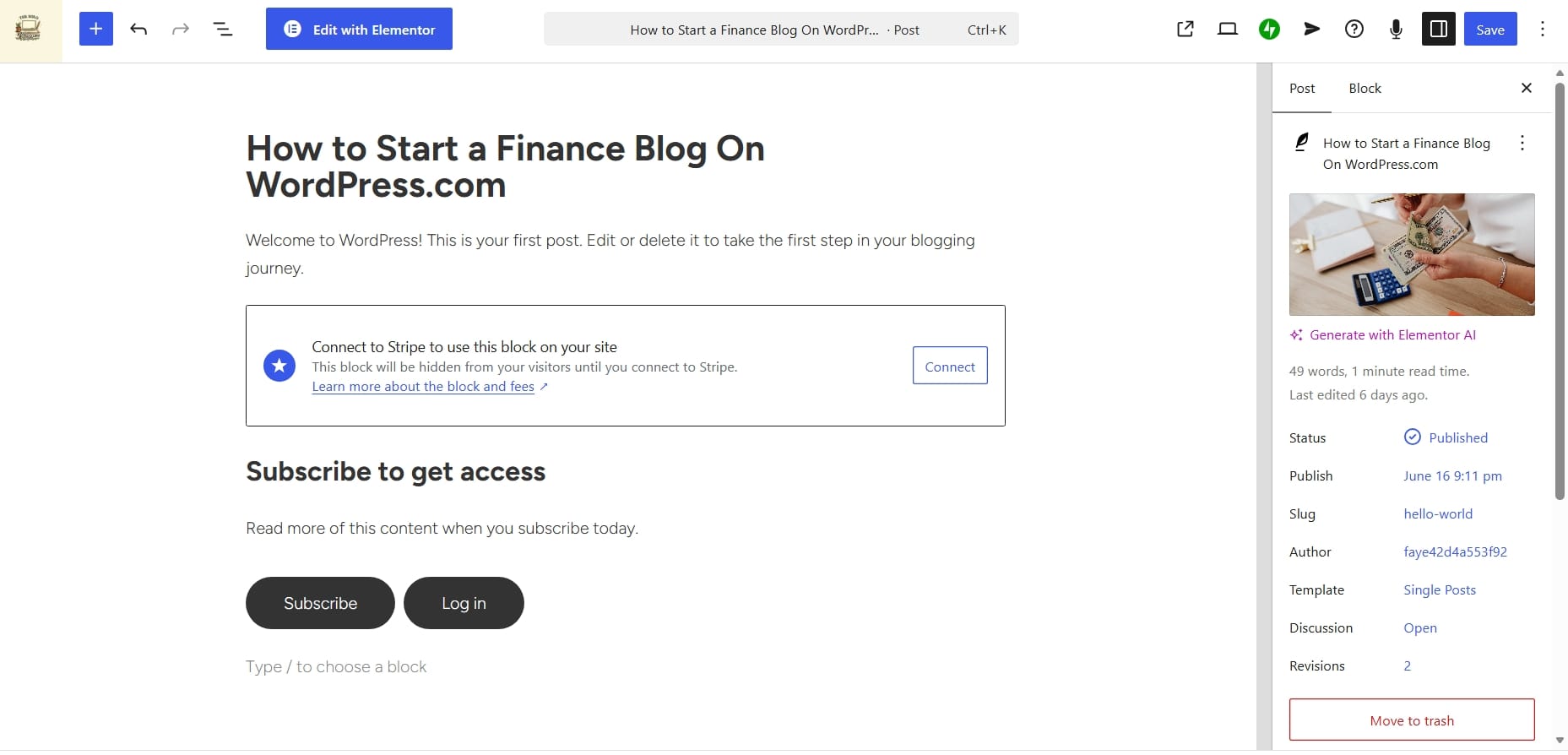
Then WordPress.com allows you to configure payment settings with Stripe connect.
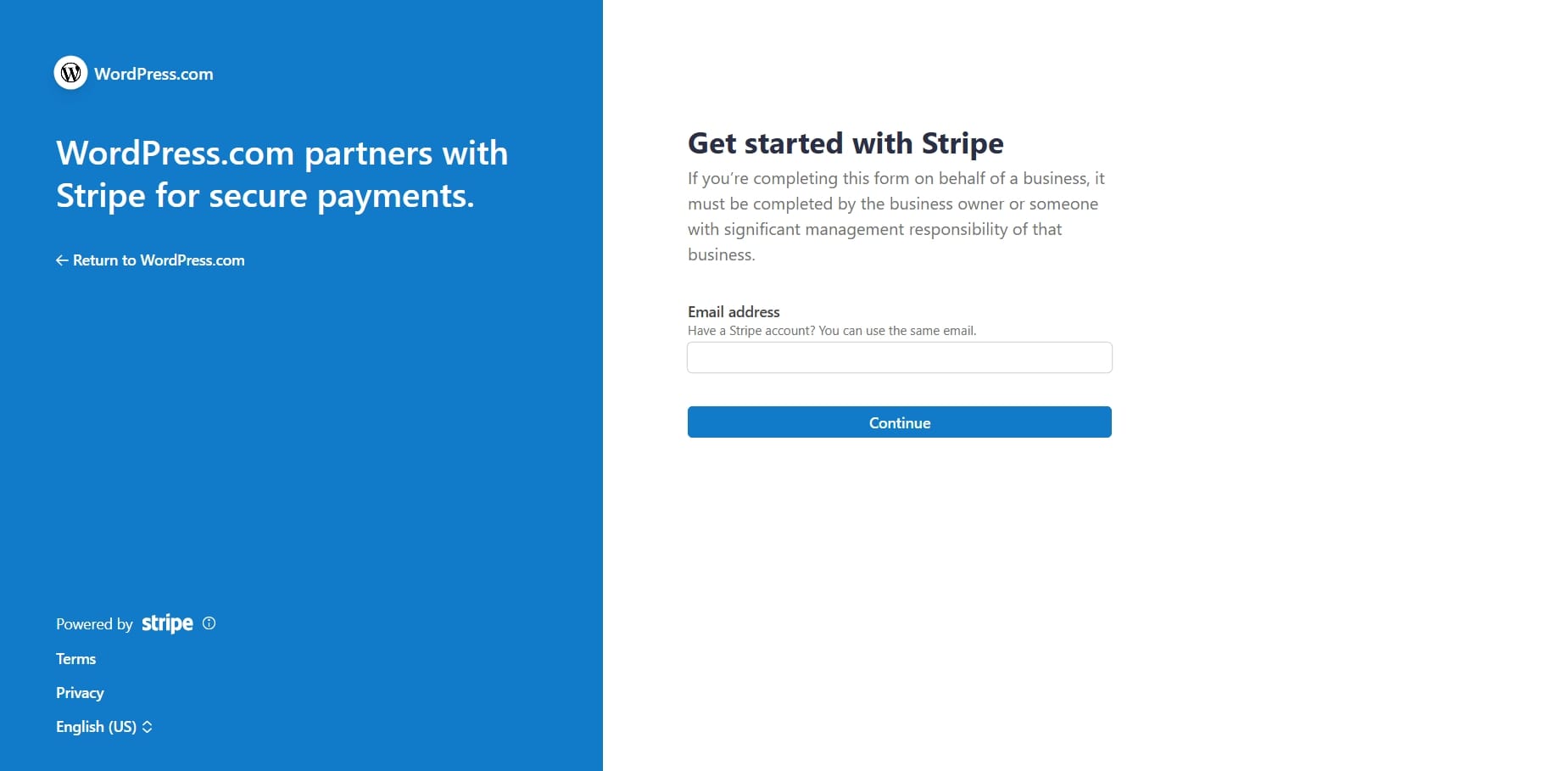
You choose:
- Subscription pricing
- Who gets access
- Payment collection settings
- Subscriber permissions
Once published, visitors can see the locked content but cannot access it unless they subscribe. The payment system works automatically, no third-party software required.
You can also choose to restrict content for free members only, so that way readers can exchange their emails with you to access a content for free.
Who Should Actually Use Paid Content?
This is important.
Not every blog needs paid subscriptions. Some blogs naturally work better than others.
Paid subscriptions work best when your audience values expertise, knowledge, education, or exclusive resources.
Good niches include finance blogs, business blogs, software/tech blogs, book blogs and recipe blogs.
If your audience values information, subscriptions work beautifully.
The Hidden Problem with WordPress.com Built-In Paid Content
As much as I like WordPress.com’s native monetization system, there is one drawback.
Fees.
WordPress.com takes a cut from your revenue, and over time, percentages matter. The great news is that you can reduce or remove these fees by upgrading your plan.
You can also remove these fees if you choose not to use WordPress.com built-in paid content feature and rather use a plugin like WooCommerce.
Since you can install plugins on any of WordPress.com plan including their Personal plan ($4/month billed yearly), it could be more ideal for you.
WooCommerce allows you to build your own monetization system.
You can sell:
- Digital products
- Membership subscriptions
- Courses
- Premium communities
- Physical products
- Downloadable products
- Subscription services
And the biggest advantage?
WordPress.com charges 0% fees when using WooCommerce.
This becomes extremely valuable once your blog starts generating serious revenue.
But There Is One Big Catch
WooCommerce is a plugin and plugins cannot be installed on WordPress.com free plan. This means free plan users cannot use WooCommerce.
Think of it like this.
Built-In Paid Content Feature
Best for:
- New bloggers
- Subscription content
- Premium articles
- Simple membership websites
Available on all plans with platform fees.
WooCommerce
Best for:
- Larger businesses
- Selling digital products
- Ecommerce stores
- Advanced monetization
Requires paid plan but no platform fees.
My Honest Advice for New Bloggers
If you are just starting do not waste your time overcomplicating things. Use the built-in paid content system.
It is simple, it works immediately, and it allows you to validate whether people are willing to pay for your content. Once your audience grows, you can always upgrade later.
I think many creators make a mistake by building complicated systems too early. You need proof of demand first, then you can scale later.
Other Smart Ways to Use Paid Content on Your Blog
Subscriptions don't only work for articles. You can sell access to many things.
Ideas include:
Private Newsletter Access
Offer weekly premium newsletters.
Resource Libraries
Sell access to templates, databases, or downloadable resources.
Premium Courses
Create educational content only subscribers can access.
Paid Communities
Charge members for private community access.
Exclusive Research Reports
Very useful for finance, SaaS, or business blogs.
Premium Tool Libraries
Curated resources behind a paywall.
The opportunity is much larger than regular people think.
Frequently Asked Questions
Can I monetize my WordPress.com blog on the free plan?
Yes. WordPress.com allows creators to set up paid subscriptions even on the free plan. The only difference is that WordPress.com charges a 10% transaction fee.
Does WordPress.com take fees from subscriptions?
Yes. Fees depend on your plan. Free plan users pay 10%, Personal users pay 8%, Premium users pay 4%, Business users pay 2%, while Commerce users pay 0%.
Is WooCommerce better than WordPress.com paid content?
WooCommerce offers more flexibility and no platform fees, but requires plugin support which is unavailable on the free plan.
Can I sell digital products using paid subscriptions?
You can restrict premium downloadable content using paid subscriptions, but WooCommerce usually works better for full digital product stores.
Is subscription income better than ads?
For many bloggers, yes. Subscription income tends to be more stable and less dependent on search engine traffic.
Can small blogs make money with subscriptions?
Absolutely. Even a small loyal audience can generate significant recurring revenue when people genuinely value your content.
To Conclude This Blog Post
The biggest mistakes bloggers make is viewing their website as nothing more than a place to publish articles. A blog can be far more than that.
- A blog can become an asset.
- A blog can become recurring income.
- A blog can become a business.
This is one reason I continue recommending WordPress.com for beginners. People underestimate how much functionality is already built directly into the platform. And the fact that you can literally start monetizing on the free plan is impressive.
All you need is valuable knowledge people are willing to pay for. Because the smartest blogs are rarely built around traffic alone. They are built around ownership, value, and long-term monetization.
You might also like
10 Best Ecommerce Tools for Bloggers Selling Products Online in 2026
Want to monetize your blog? Compare the best ecommerce tools for selling digital products, courses, memberships, newsletters, webinars, and physical products online.

Sellfy Review 2026: Complete Beginner Tutorial for Selling Products Online
Sellfy is one of the easiest ecommerce platforms for creators selling digital products, memberships, subscriptions, and physical products. Here is a complete Sellfy review and tutorial for beginners.

10 Proven Online Business Ideas to Make Money Online In 2026
You don't need a big team, a huge budget, or years of experience to build a profitable online business. You need the right idea and a plan. Here are 10 proven models that people are using right now to generate consistent income and exactly what it takes to get started.