Tailwind Review 2026: Complete Beginner Tutorial for Bloggers
Tailwind is one of the most popular social media scheduling tools for bloggers and creators. In this review and tutorial, I'll show you how to use Tailwind, its features, pricing, and whether it's worth using in 2026.

Pinterest remains one of the best traffic sources for bloggers.
The best part is that Pinterest works more like a visual search engine. A single well-optimized Pin can continue driving visitors to your blog for months or even years after it has been published.
If you're focused on long-term growth, Pinterest is incredibly valuable.
But one challenge about using Pinterest is staying consistent.
Creating fresh Pins, writing keyword-rich descriptions, choosing the right boards, publishing at the right time, and repeating the process every time you publish a new article can quickly become overwhelming.
Once your blog starts growing, you may find yourself spending more time promoting content than actually writing it.
That's where Tailwind comes in.
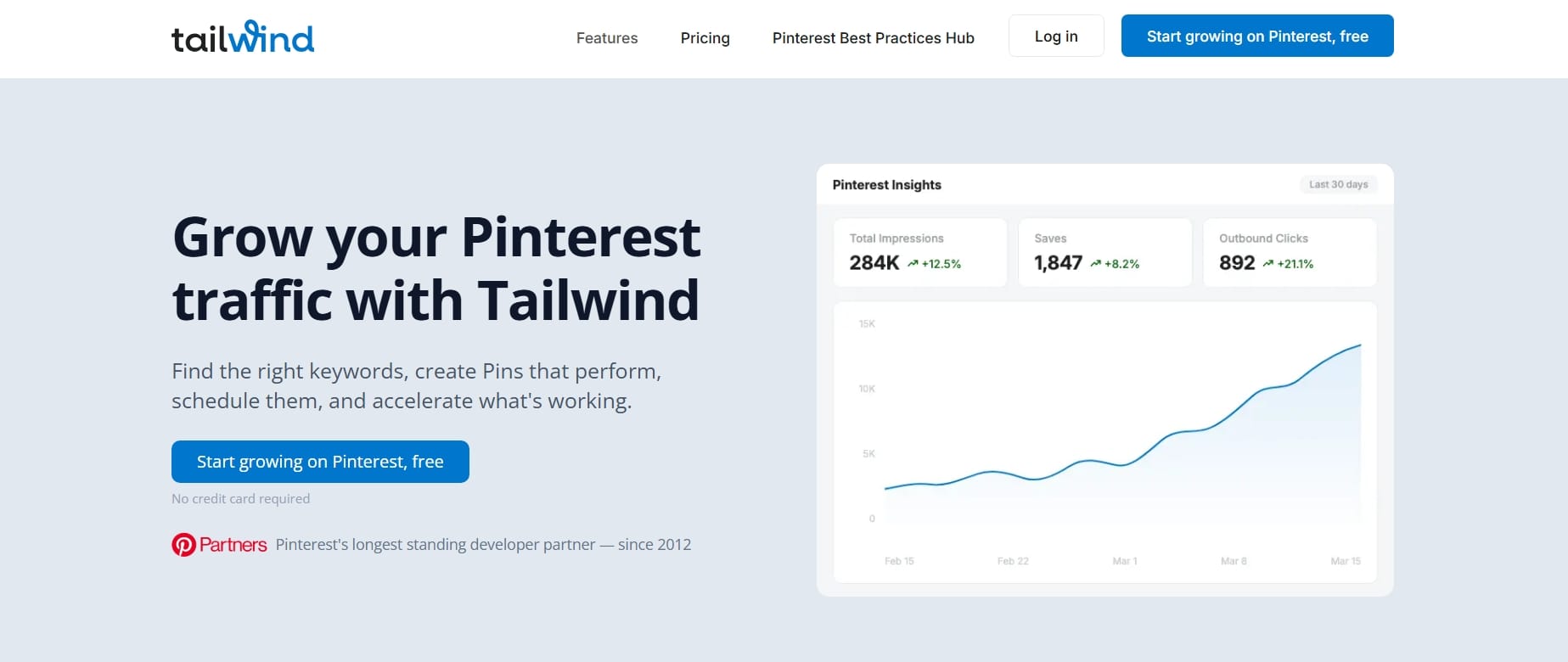
Tailwind is one of the most popular Pinterest and Instagram marketing tools built specifically for bloggers, creators, and small businesses. It helps you schedule content in advance, discover new design ideas, organize your publishing calendar, analyze your performance, and spend less time managing social media.
I'll be creating a new Tailwind account for this Tailwind review and tutorial so I can show you exactly how the platform works from a beginner's perspective. Throughout this guide, I'll explain each feature using my own experience and show you where Tailwind can genuinely save time and where it may not be necessary.
Whether you've just started your first blog or you're looking for a better way to grow consistent traffic, this tutorial will help you understand what Tailwind offers and whether it's worth adding to your blogging toolkit.
Quick Verdict: Is Tailwind Worth It?
If you're serious about using Pinterest as a traffic source, I believe Tailwind is one of the best investments you can make.
It isn't a tool that magically sends thousands of visitors to your blog overnight. Instead, it helps you build one of the most important habits in blogging: consistency.
Rather than logging into Pinterest every day to upload Pins manually, Tailwind lets you batch your work, schedule weeks or months of content in advance, and focus on creating great blog posts.
Tailwind at a Glance
| Category | Verdict |
|---|---|
| Ease of Use | ⭐⭐⭐⭐⭐ |
| Beginner Friendly | ⭐⭐⭐⭐⭐ |
| Pinterest Marketing | ⭐⭐⭐⭐⭐ |
| Instagram Scheduling | ⭐⭐⭐⭐☆ |
| AI Features | ⭐⭐⭐⭐☆ |
| Analytics | ⭐⭐⭐⭐☆ |
| Value for Bloggers | ⭐⭐⭐⭐⭐ |
Tailwind is best for:
- Bloggers
- Pinterest marketers
- Content creators
- Affiliate marketers
- Digital product sellers
- Small businesses
If Pinterest is part of your traffic strategy, Tailwind is absolutely worth considering.
What Is Tailwind?
Tailwind is a social media scheduling and marketing platform designed primarily for Pinterest and Instagram.
Founded in 2012, Tailwind has become one of the most trusted marketing tools among bloggers and creators because it focuses on helping users publish consistently while saving time.
Scheduling is only one part of what Tailwind does.
Tailwind is a complete content marketing platform with tools for designing Pins, generating captions using artificial intelligence, analyzing performance, discovering trending content, organizing campaigns, and planning content months ahead.
Another important advantage is that Tailwind is an official Pinterest Partner.
This means the platform follows Pinterest's best practices and integrates directly with Pinterest's publishing system, giving users confidence that scheduled Pins are being published safely.
Why Bloggers Should Use Tailwind
One of the biggest misconceptions about blogging is that writing the article is the hardest part. In reality, publishing is only the beginning.
Once you've written an article, you need people to discover it.
And yes, search engines may eventually send traffic, but SEO may take months before you start seeing meaningful results.
Pinterest can shorten that waiting period by sending visitors much earlier, especially if your content solves problems people actively search for.
But the main issue is consistency.
Imagine publishing one new blog post every week. If you create just five Pins for each article, you'll already have twenty Pins every month.
Now imagine your blog reaches one hundred articles. You suddenly have hundreds of Pins to manage. Doing all of that manually would be so exhausting and time consuming, you won't have enough time to focus on writing or updating your blog posts and other areas of your life.
Tailwind solves this problem by allowing you to prepare your Pins in one sitting and schedule them across several weeks or months.
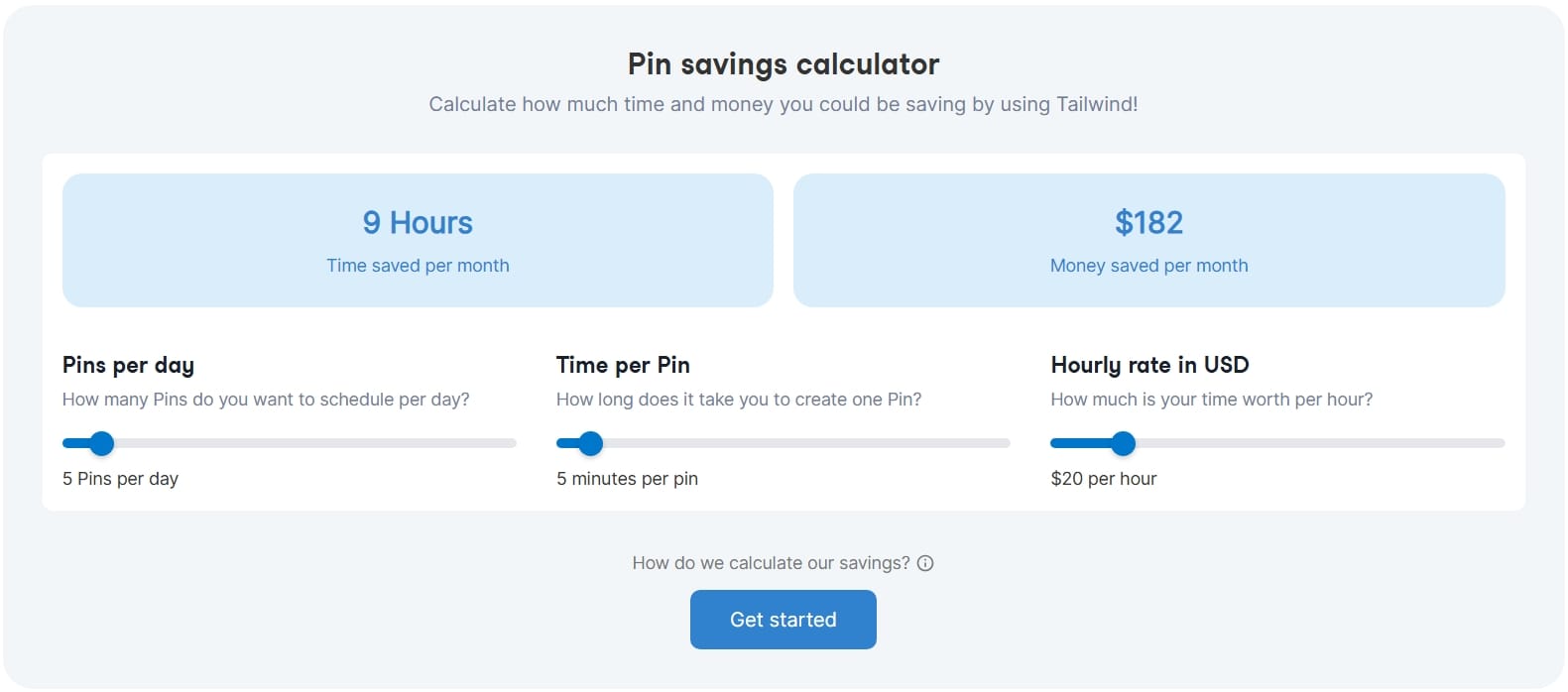
See how much time and money Tailwind can save you as a blogger with Tailwind pin savings calculator. Locate it at the bottom of their pricing page.
- That means more time writing.
- More time improving SEO.
- More time creating products.
- And less time worrying about whether you've remembered to publish today's Pin.
Another reason I recommend Tailwind is that it encourages consistency and Pinterest rewards accounts that publish regularly.
Tailwind Features
Let's look at the features that make it particularly useful for bloggers.
Pinterest Scheduler
This is the feature Tailwind is most known for.
The process is simple, you upload multiple Pins, select the boards you want them to appear on, choose publishing dates, and Tailwind automatically publishes everything according to your schedule.
If you enjoy batching your work, this feature alone can save hours every month.
Instagram and Facebook Scheduler
Tailwind also supports Instagram and Facebook.
You can schedule posts, plan your feed, organize campaigns, and maintain a consistent publishing schedule without constantly switching between devices.
Although Pinterest remains Tailwind's strongest area, Instagram and Facebook scheduling is a useful bonus for bloggers building audiences across multiple platforms.
Tailwind Create
Creating attractive Pinterest graphics usually do take longer than writing an article itself.
Tailwind can generate multiple Pin designs using your brand colours, images, headlines, and website. You also have the option to customize the designs before publishing them.
This feature is particularly helpful for bloggers who don't have a graphic design background.
Tailwind Keyword Tool
Pinterest is a search engine, so using the right keywords is essential if you want your Pins to be discovered.
Tailwind's Keyword Tool helps you find relevant search terms that people are actively using on Pinterest. You can use these suggestions to optimize your Pin titles and descriptions, increasing the chances of your content appearing in search results.
SmartSchedule
Knowing when to publish is almost as important as what you publish.
Tailwind's SmartSchedule automatically recommends the best publishing times based on your audience activity.
Rather than guessing when your followers are online, Tailwind helps optimize your schedule for better visibility.
Tailwind Communities
Tailwind Communities are groups of creators who share content within similar niches.
For example, bloggers writing about finance, travel, food, productivity, or business can join communities related to those topics.
It creates opportunities for increased exposure while also discovering high-quality content from other creators.
AI Writing Assistant
Writing Pinterest titles and descriptions can become very tiring and you most likely will run out of ideas.
Tailwind includes AI-powered writing tools that help generate title and descriptions for your pins.
While I wouldn't recommend relying on AI entirely, however, it's useful when you need inspiration or want to speed up repetitive writing tasks.
Analytics
Tailwind includes built-in analytics showing how your Pins perform over time.
You can identify which designs attract the most engagement, which boards perform best, and which content generates the strongest results.
This allows you to make smarter decisions instead of guessing what works.
Link Management
Tailwind also helps manage destination URLs more efficiently, making it easier to organize campaigns and direct users to the correct blog posts, landing pages, or product pages.
For bloggers promoting affiliate content or digital products, it's actually useful.
Tailwind Pricing
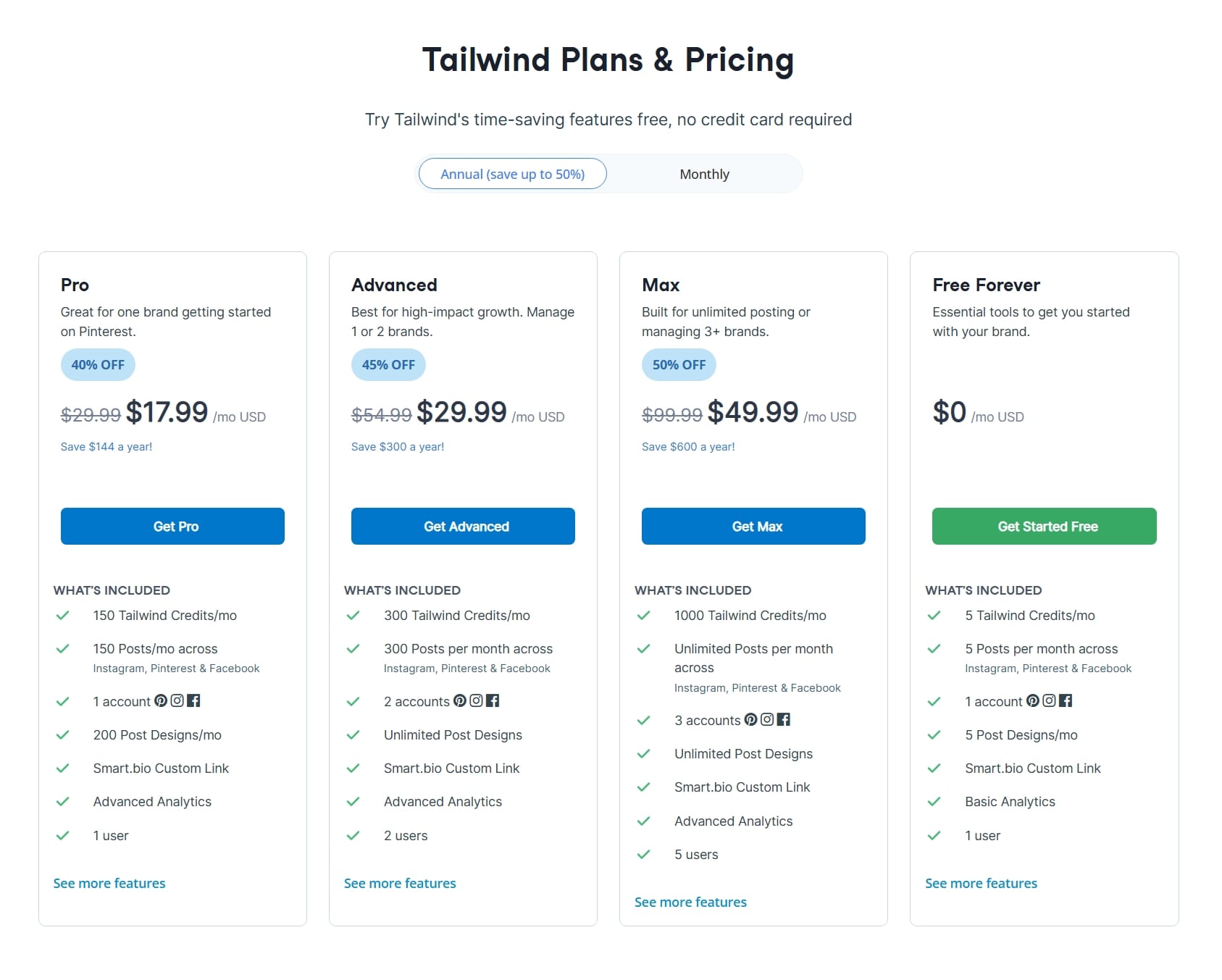
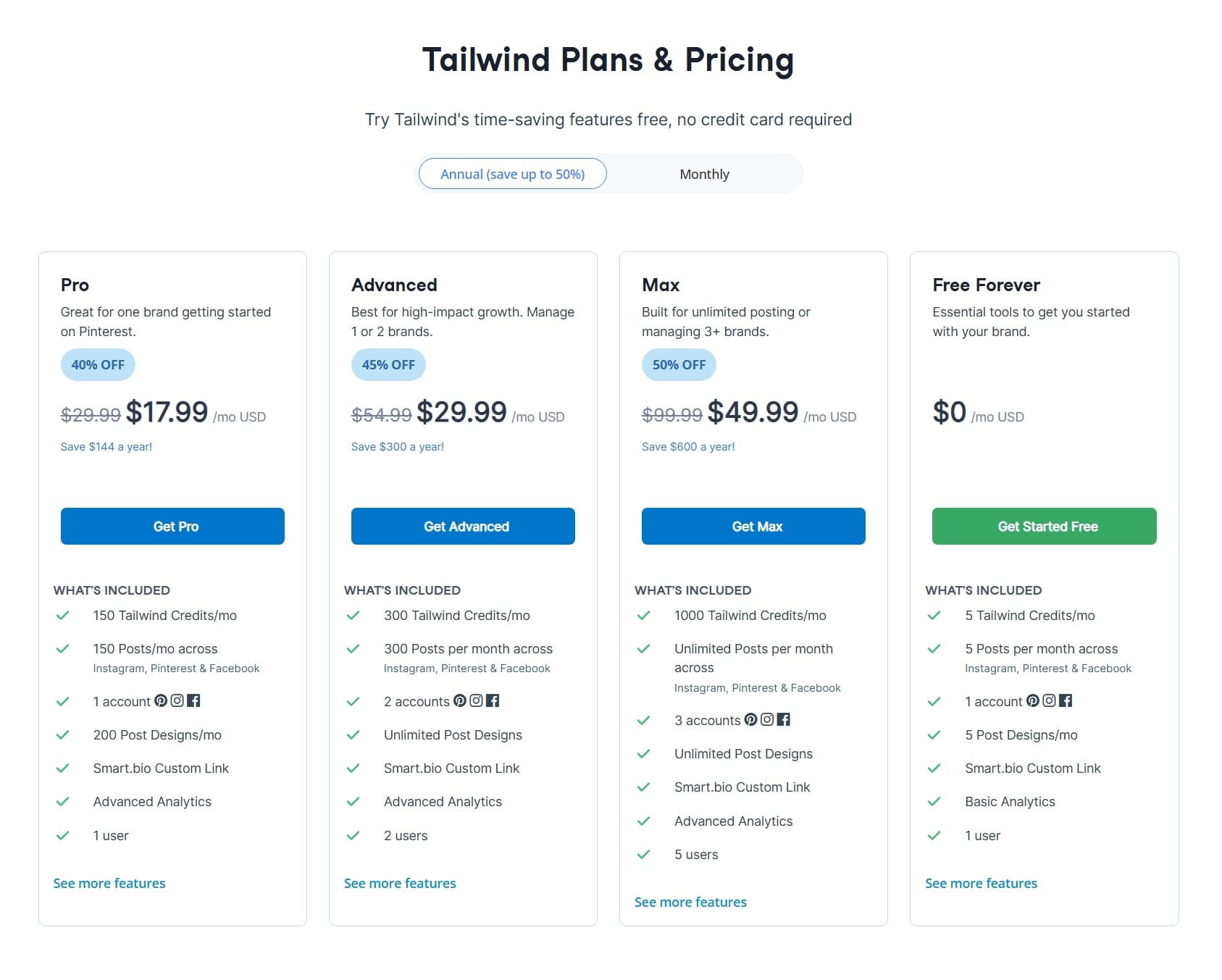
One thing I appreciate about Tailwind is that it offers a free plan, allowing bloggers to explore the platform before committing to a subscription.
As your blog grows, you can upgrade for additional scheduling capacity, AI credits, and more advanced features.
| Plan | Best For | Highlights |
|---|---|---|
| Free ($0) | Beginners | Limited scheduling, basic AI features, explore the platform before upgrading |
| Pro ($29.99) | Growing bloggers | More scheduled posts, additional AI credits, advanced publishing tools and analytics |
| Advanced ($54.99) | Businesses and creators | Larger publishing limits, enhanced collaboration features, deeper analytics and productivity tools |
| Max ($99.99) | Teams and power users | Highest limits, priority features, and extensive marketing capabilities |
Tailwind occasionally updates its pricing and feature limits, so it's always worth checking the latest plans on its official website before subscribing.
I recommend beginning with the free plan. It gives you enough functionality to understand how the platform works and decide whether it fits your workflow before investing in a paid subscription.
Getting Started with Tailwind
Now that we've covered what Tailwind does, it's time to create an account and explore the dashboard together.
For this tutorial, I'm starting with a brand-new account, so the experience matches what you'll see as a first-time user.
Step 1: Create Your Tailwind Account
Head over to the Tailwind pricing page and pick a plan, you can get started for free.
You'll be asked to sign up using your Pinterest account, Google account, or an email address.
After verifying your account, Tailwind will ask a few questions about how you plan to use the platform.
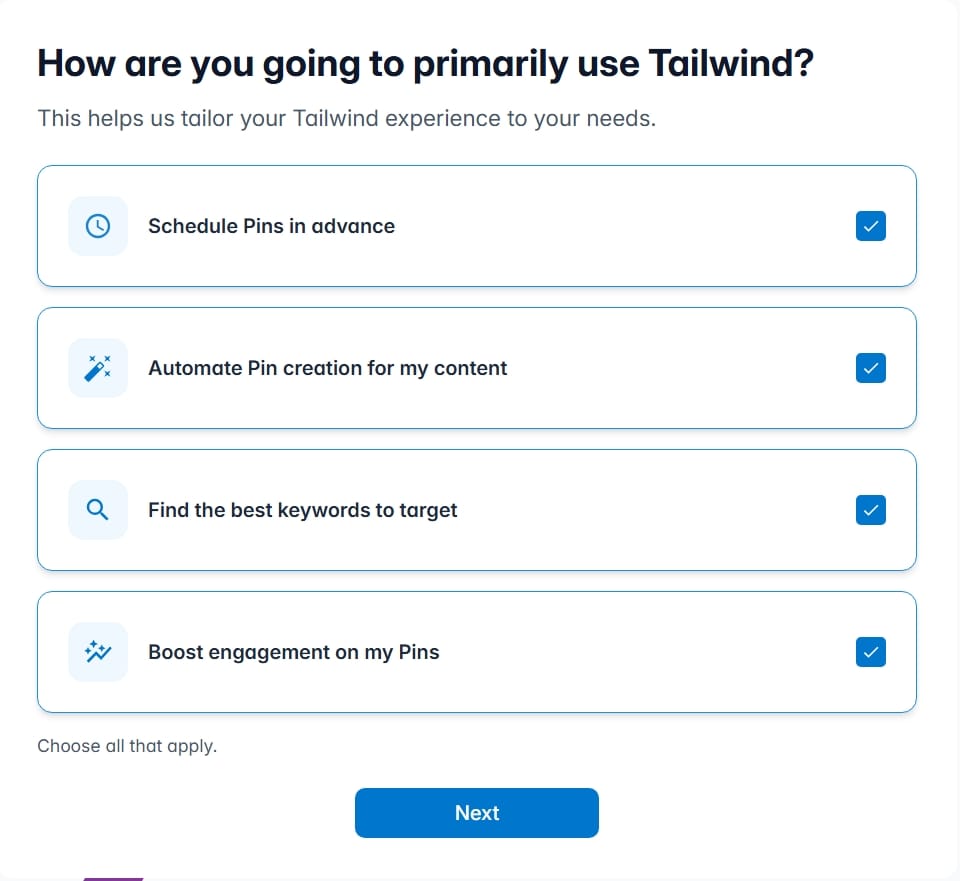
This helps personalize your dashboard and recommend relevant features based on whether you're a blogger, business owner, creator, or marketer.
Once you've completed the onboarding process, you'll arrive at your dashboard, where the real setup begins.
Step 2: Connect Your Pinterest Account
During the onboarding process, you'll have the option to connect your Pinterest account but if you skipped the step, you could still do that.
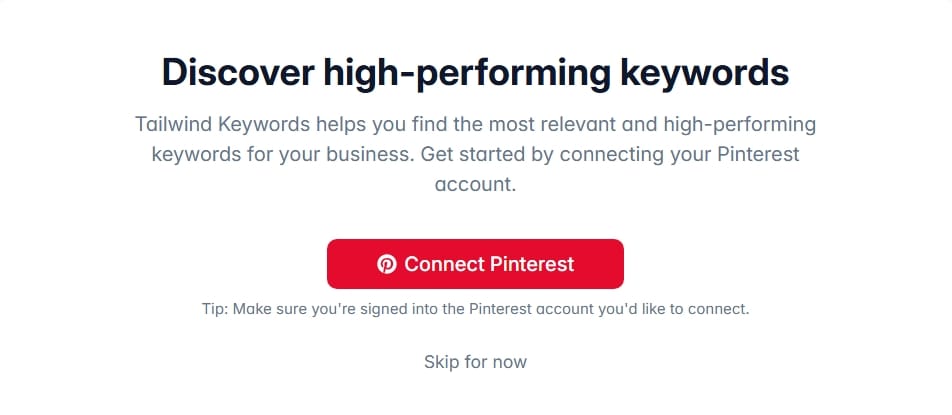
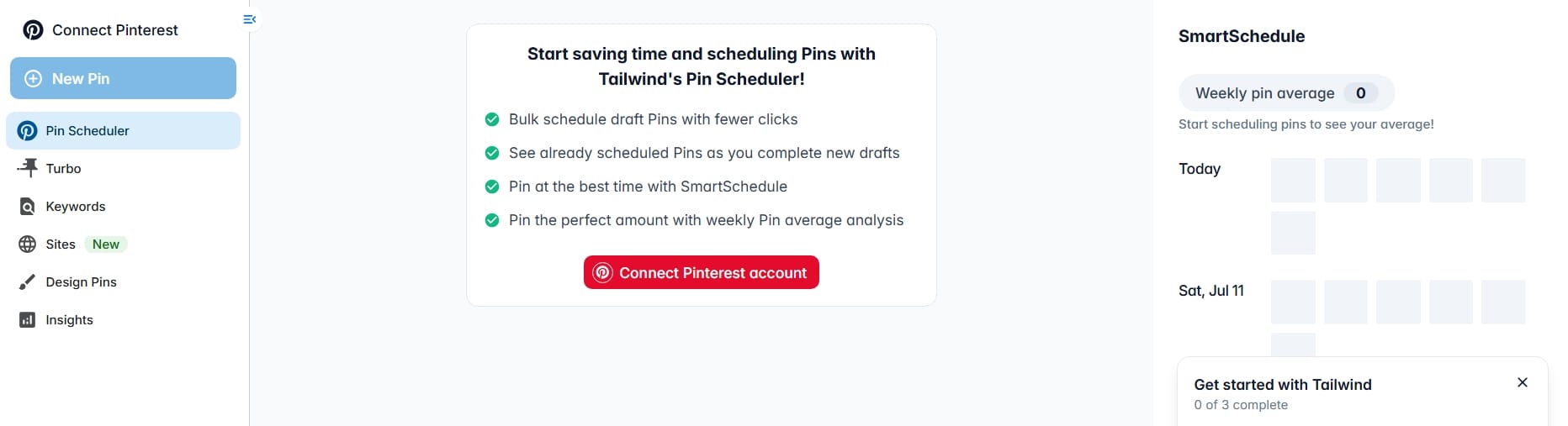
In your Tailwind dashboard, Click Connect Pinterest account and authorize Tailwind to access your Pinterest profile. This allows Tailwind to create and schedule Pins on your behalf.
Pinterest will ask you to review the permissions Tailwind needs before approving the connection. Since Tailwind is an official Pinterest Partner, this process is secure and follows Pinterest's publishing guidelines.
Once connected, Tailwind will automatically import your Pinterest boards, making them available when scheduling Pins.
If you manage multiple Pinterest accounts, Tailwind also allows you to connect and switch between them, which is especially useful for agencies or creators managing more than one brand.
Step 3: Explore Your Dashboard
Before jumping into scheduling, spend a few minutes exploring the dashboard.
- Home
- Pin scheduler
- Turbo
- Keywords
- Sites
- Design pins and
- Insights
The dashboard gives you a quick overview of scheduled posts, recent activity, recommended tasks, and shortcuts to frequently used tools.
Step 4: Schedule Your First Pinterest Pin
To schedule your first Pin:
- Open the Pin Scheduler section.
- Click Upload Pin.
- Upload your Pinterest image.
- Paste your blog post URL.
- Add your Pin title.
- Write a keyword-rich description.
- Choose the Pinterest board where the Pin should be published.
- Select a publishing date and time.
- Click Schedule.
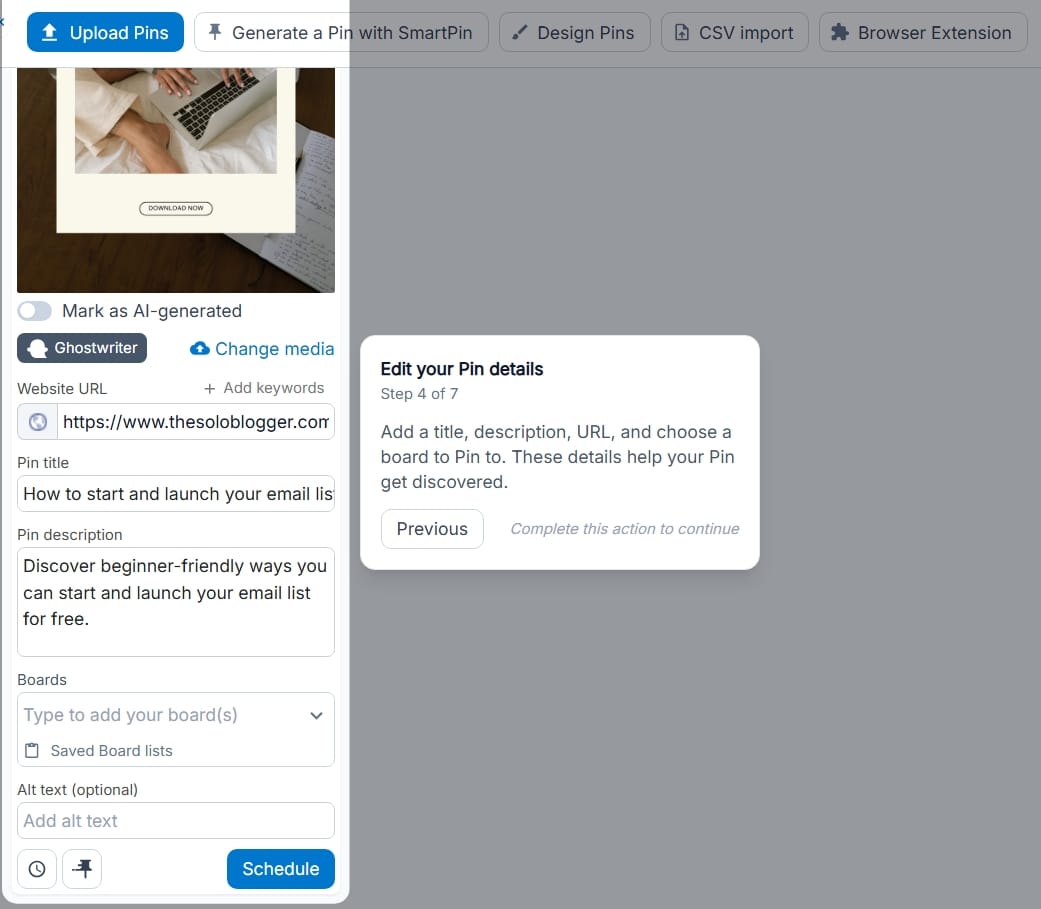
And that's it.
Your Pin now enters your publishing queue and will automatically be posted according to your chosen schedule. You can upload ten, twenty, or even fifty Pins during one sitting and spread them across the coming weeks.
A good thing to know about using Tailwind is that you can make carousel pins.
It's a great thing because Pinterest don't usually support carousel pins except on ads. So, if you add more than one image it will come as a video pin rather than two sliding image pins.
To do that:
- Upload your first designed pin.
- When you try to click your uploaded pin two buttons appear: Carousel and Tag Products. Click on Carousel.
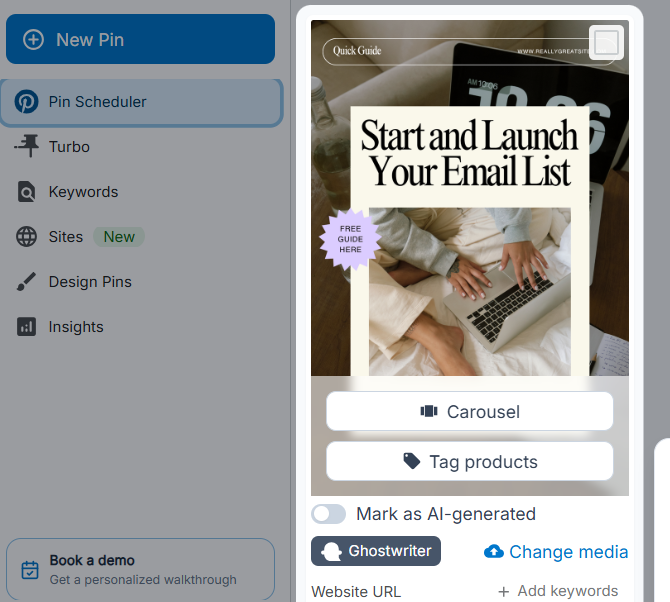
Once you do that, you'll be able to add more images to your pin.
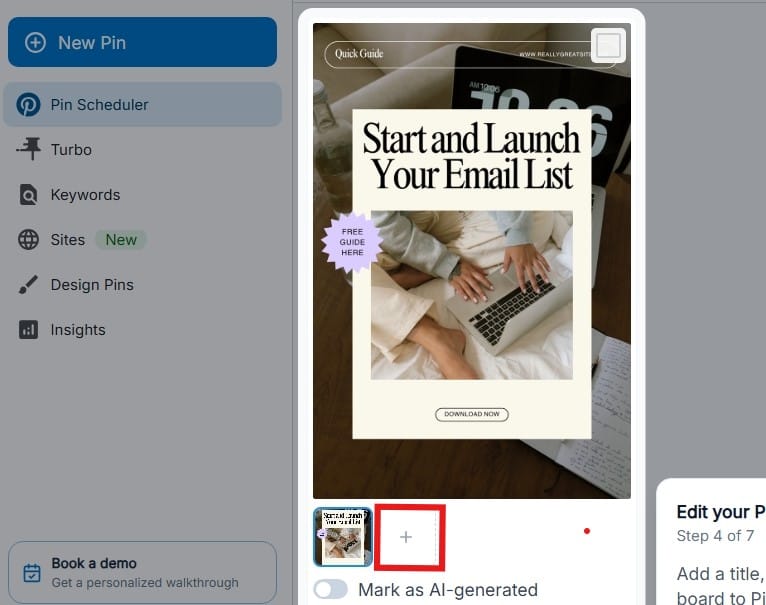
Writing Better Pinterest Titles and Descriptions
Before moving on, I want to talk about something very important.
Pinterest isn't just a social media platform it also functions as a search engine. That means your titles and descriptions should include keywords people are actually searching for.
Avoid vague descriptions and explain exactly what readers will learn and naturally include relevant keywords.
Tailwind SmartSchedule
One of the questions may ask is: "When should I publish my Pins?"
The honest answer is that it depends on your audience.
Instead of guessing, Tailwind's SmartSchedule analyzes activity patterns and recommends publishing times that are likely to generate more engagement.
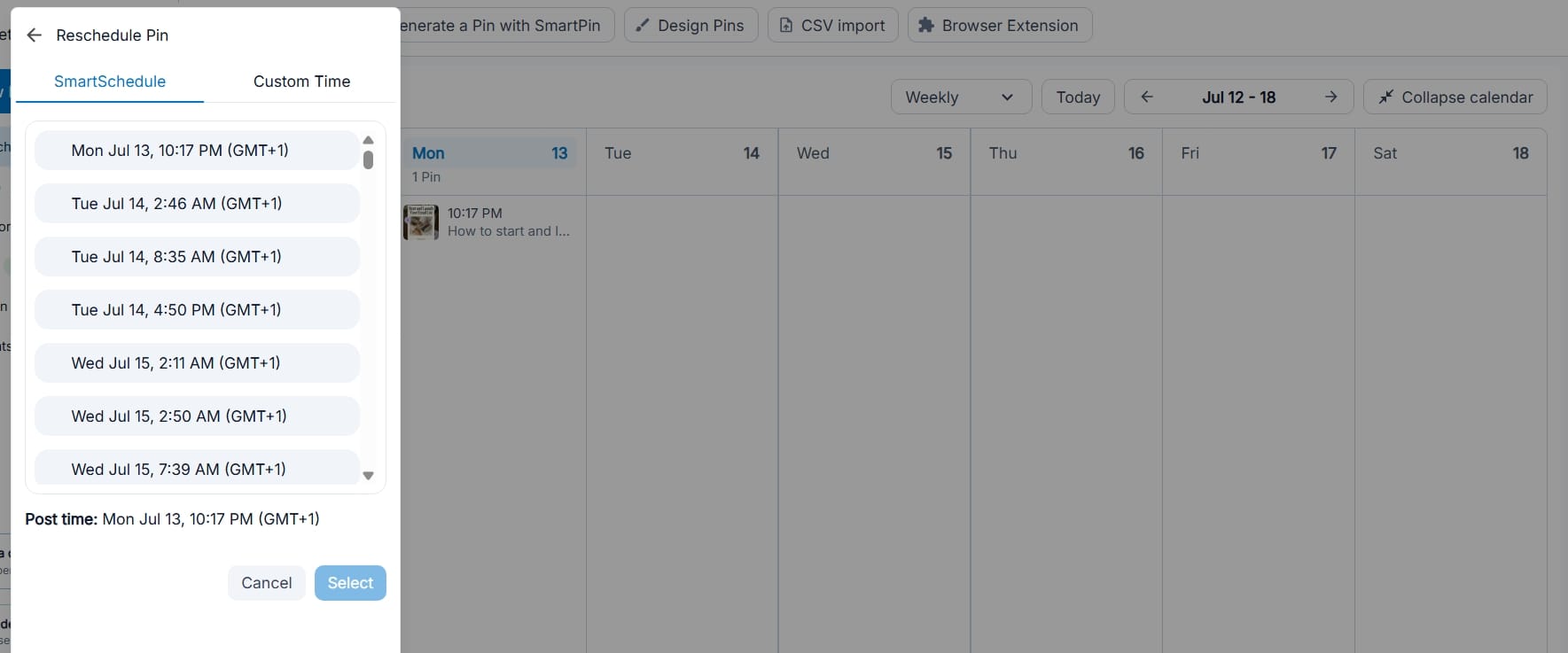
While no scheduling tool can guarantee viral results, posting consistently during active periods generally performs better than publishing randomly.
Personally, I still recommend monitoring your own analytics over time since your audience may behave differently depending on your niche, country, and content type.
Use Tailwind SmartSchedule as a helpful guide rather than a strict rule.
Step 5: Creating Beautiful Pins with Tailwind Create
Rather than opening Canva and manually creating every graphic, Tailwind can generate multiple Pin designs based on your content.
To use Tailwind Create:
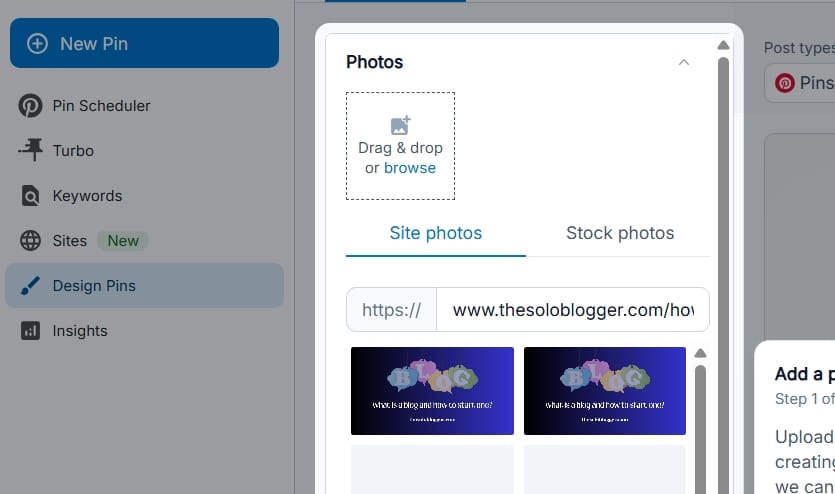
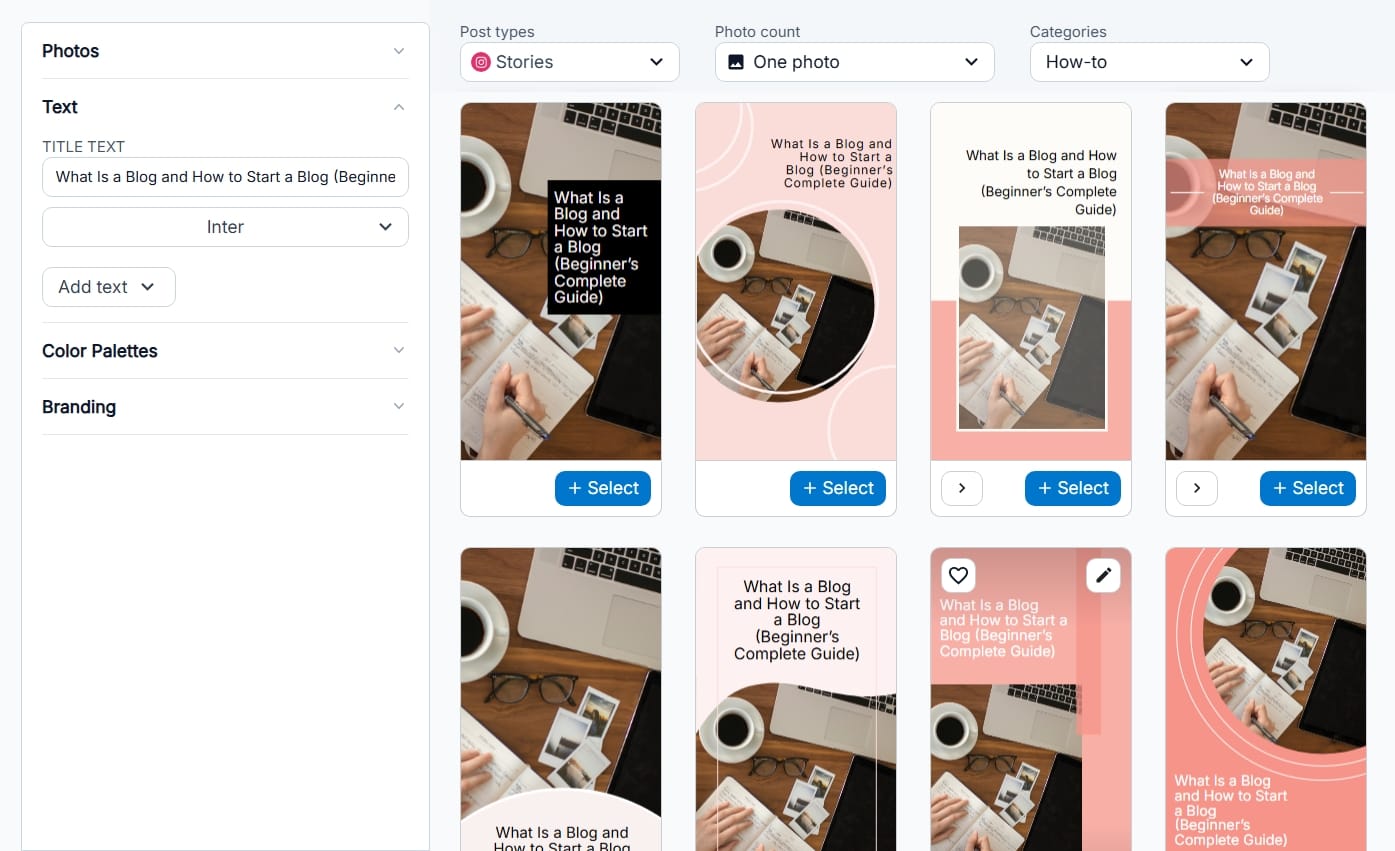
Open the Design Pin section and enter your blog post URL. Tailwind will scan the page and automatically pull out your title, featured image, and content.
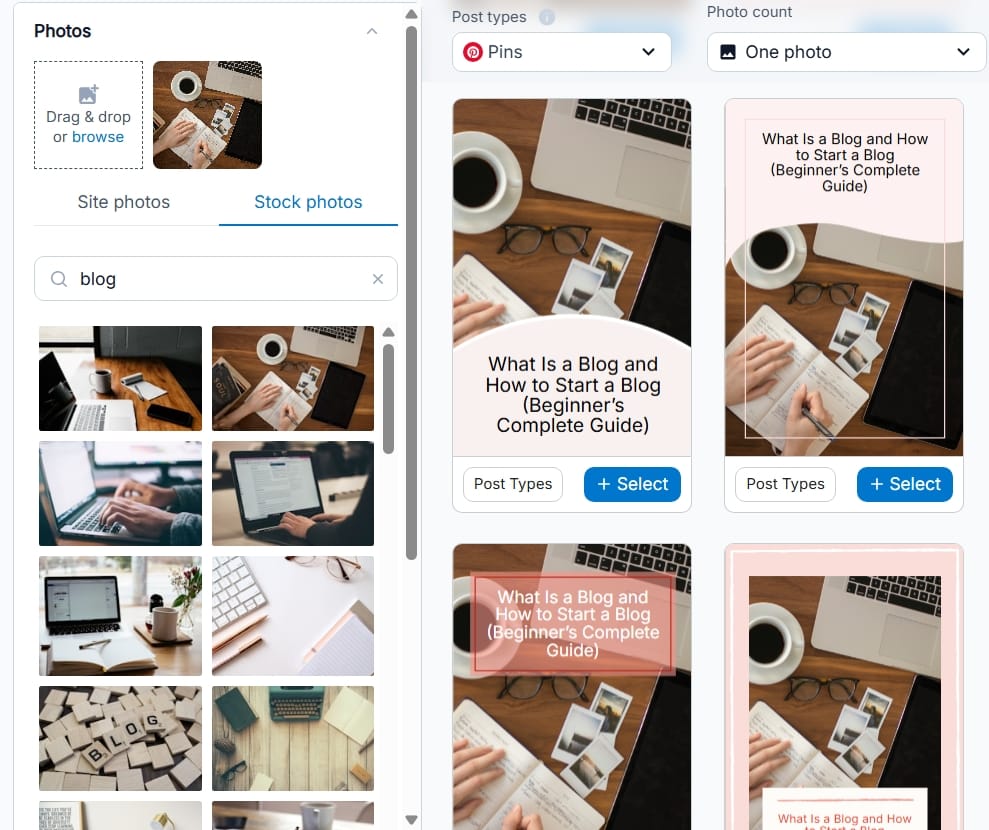
You also have the option to make use of stock photos which I honestly prefer. Simply search for your preferred image using keywords and you'll have options to pick from.
Customize your fonts, colors, images, or branding and save your favorite designs then Select one of the generated layouts to schedule or publish immediately.
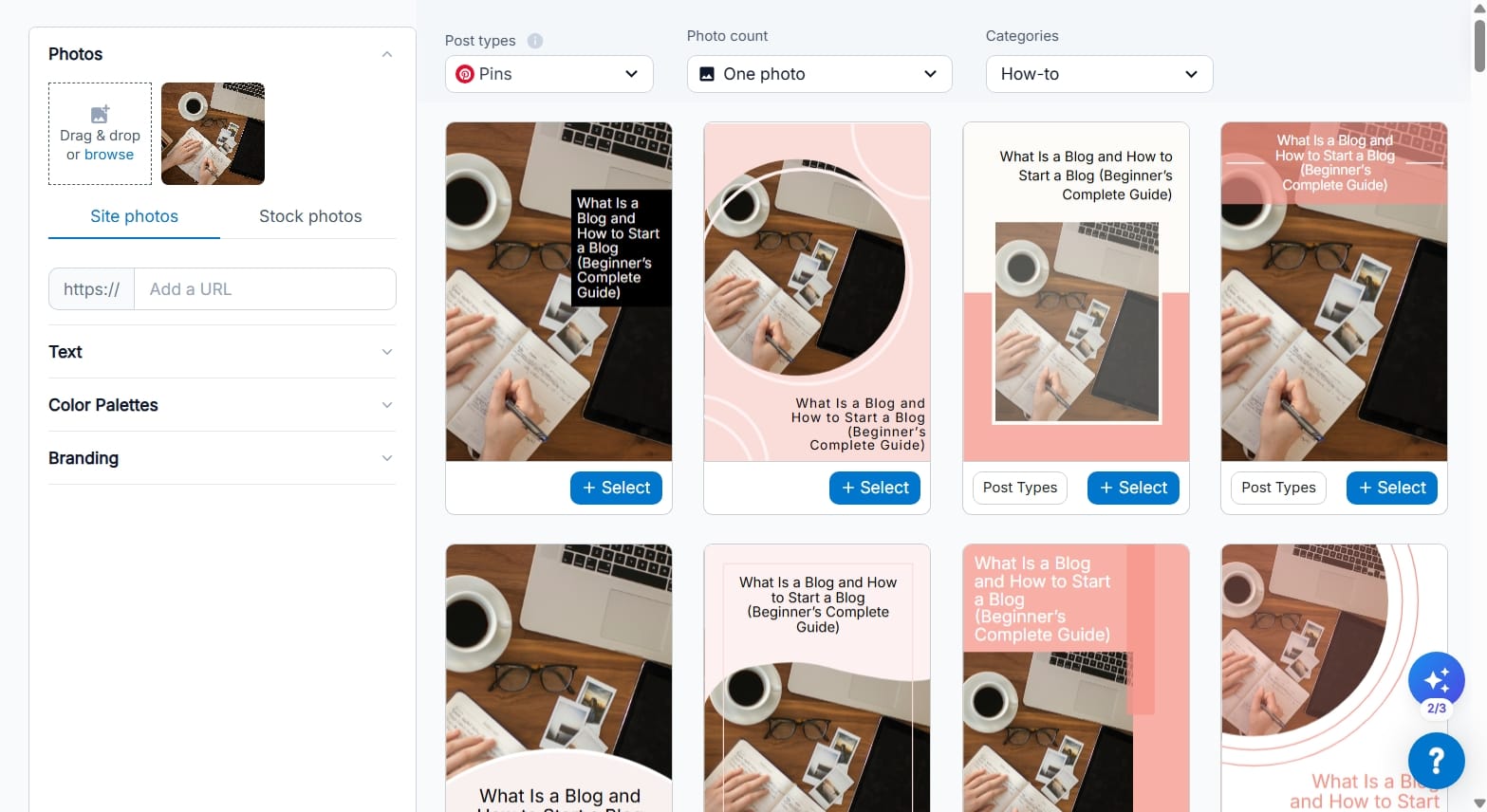
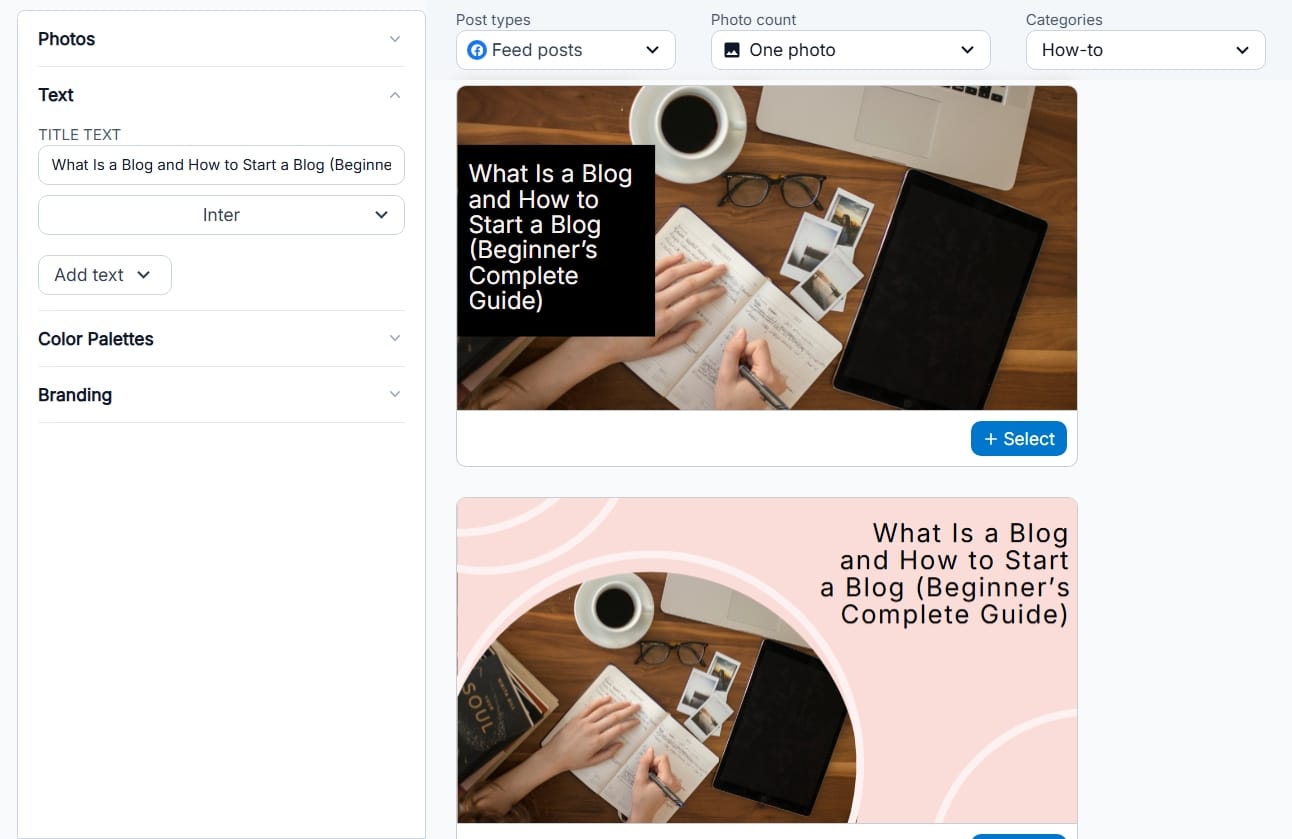
As seen in the screenshot above, Tailwind can generate so many design variations from a single article. The created pins shown in the image is just a tip of the iceberg. Simply scroll down to access more designs.
Now you can publish different designs that all lead back to the same article which is very useful because Pinterest rewards fresh content.
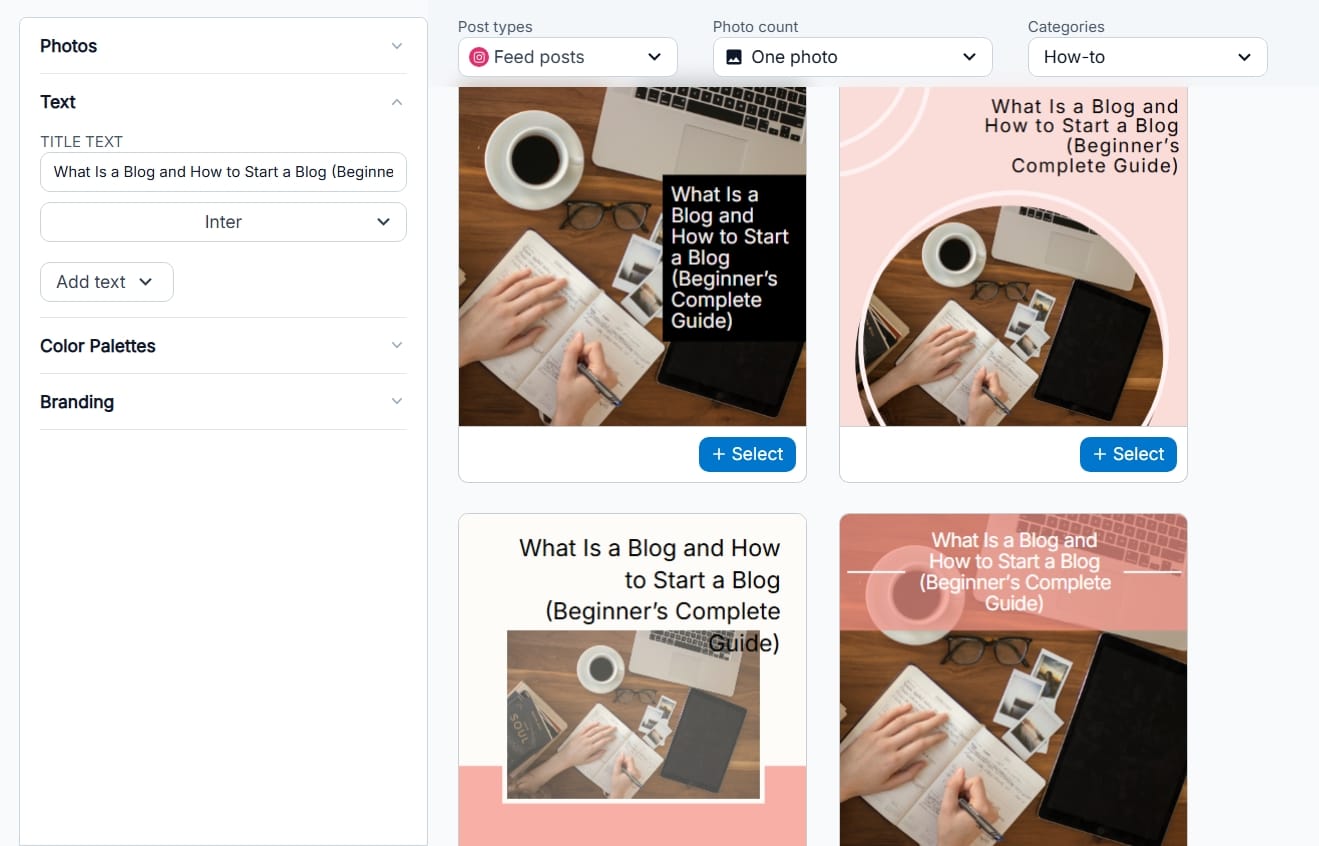
Tailwind Create works for all social media posts and not only Pinterest such as Instagram feeds, stories and Facebook feeds.
Keep Your Branding Consistent
As your blog grows, you'll want readers to recognize your content instantly. That's why I recommend using consistent branding across your Pins.
- Choose two or three brand colors.
- Use the same fonts whenever possible.
- Include your logo or website name discreetly.
- And maintain a consistent visual style.
Tailwind Create makes this easier by allowing you to reuse your preferred designs instead of starting from scratch every time.
Step 6: Using the Tailwind Keyword Tool
Since Pinterest is a search engine, using the right keywords can make a big difference in how many people discover your content.
Tailwind's Keyword Tool helps you find relevant search terms to include in your Pin titles and descriptions, making it easier for your Pins to appear in Pinterest search results.
To use it:
- Open the Keywords in Tailwind.
- Enter a topic related to your blog post.
- Browse the suggested keywords.
- Choose the most relevant ones with high search volume and include them in your Pin title and description.
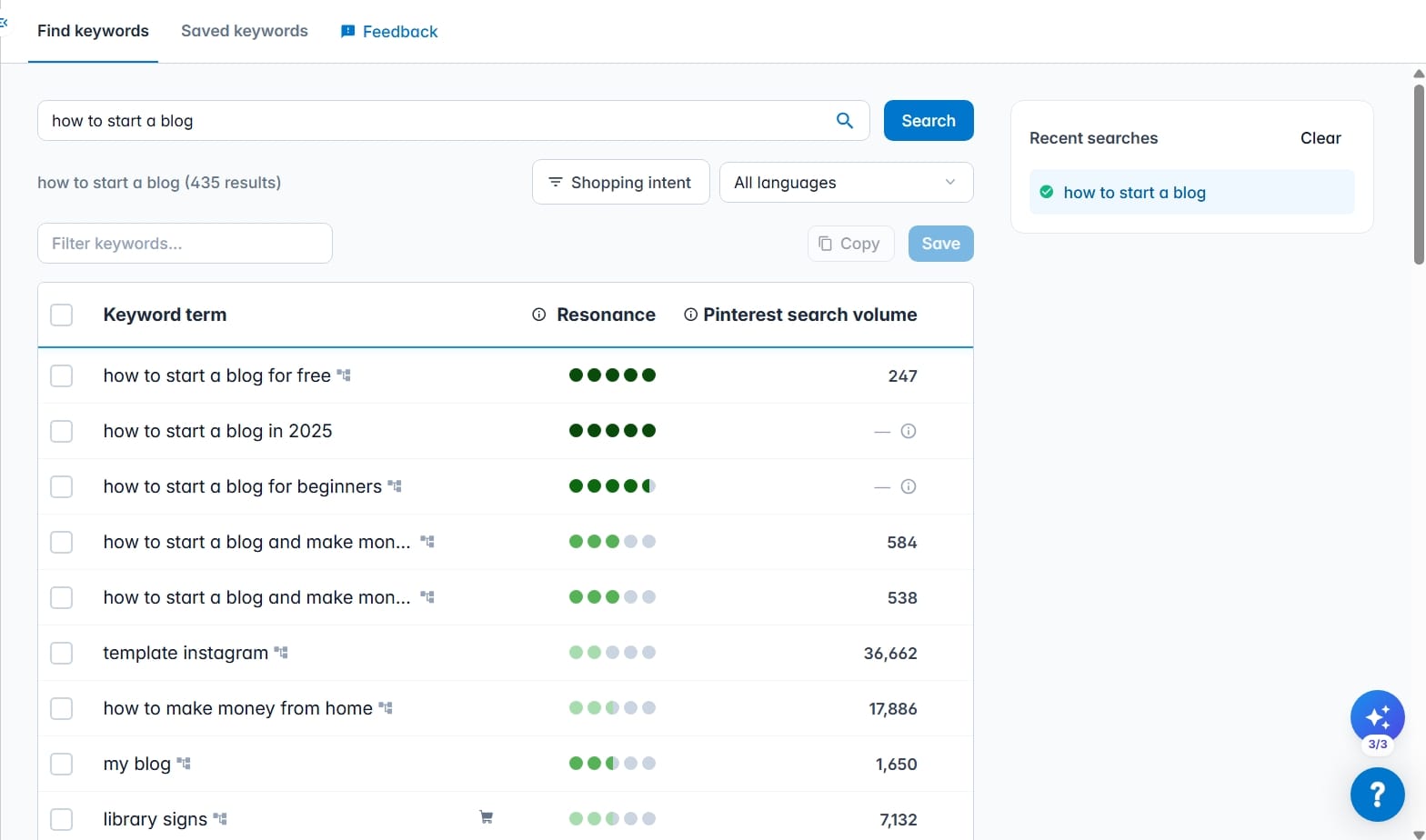
For example, if you're promoting a post about starting a finance blog, Tailwind may suggest keywords like personal finance blog, money blogging, or finance blogging tips. Use these to improve your chances of reaching people already searching for those topics.
Step 7: Understanding Tailwind Analytics
Inside the Analytics section you'll typically find information such as:
- Profile performance
- Board insights
- Pin inspector
- Website insights
- Top pins
- Activity
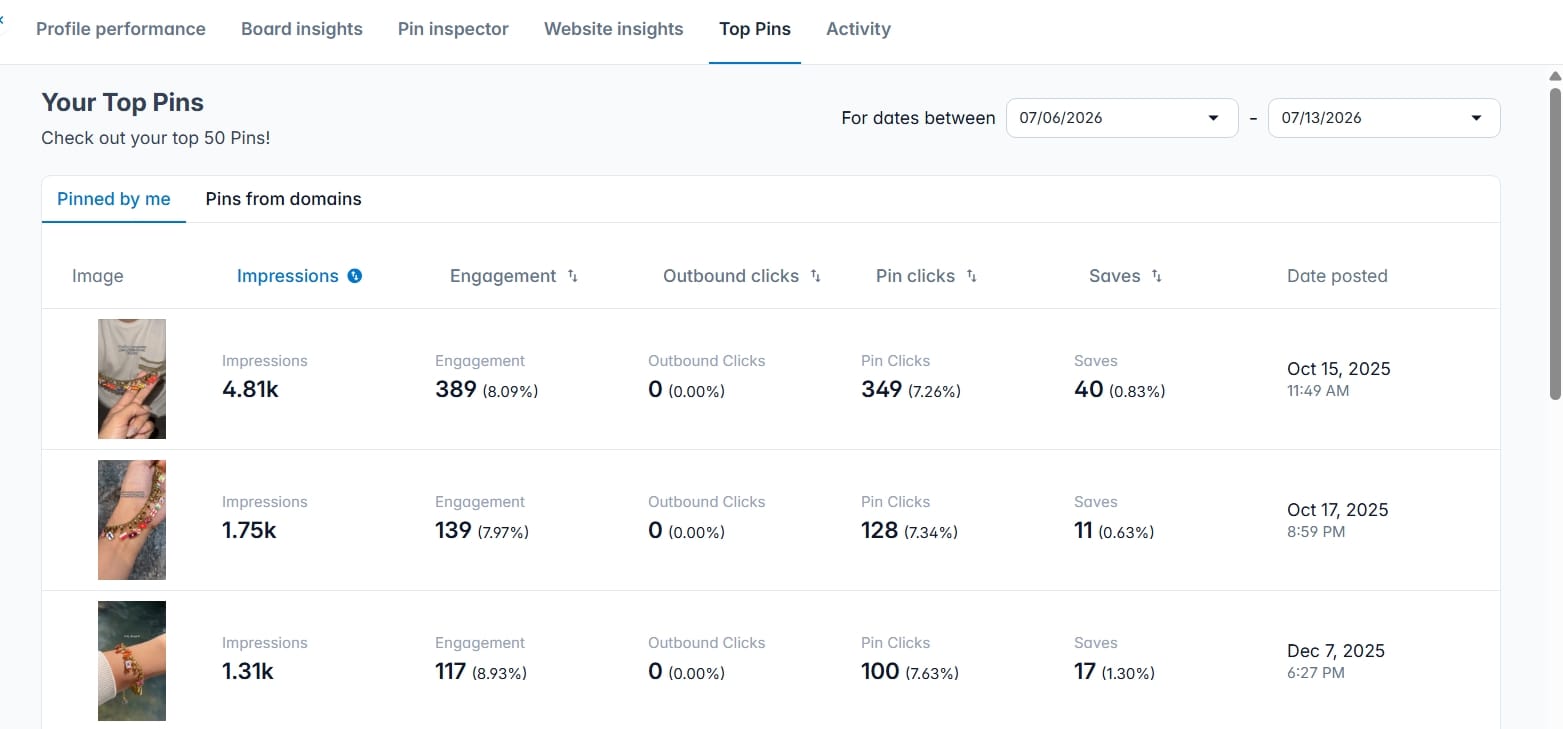
One mistake you may make is obsessing over individual Pins.
Instead, look for patterns.
- Are list articles consistently outperforming tutorials?
- Do blue graphics perform better than orange ones?
- Do certain headlines receive more clicks?
Small observations like these gradually improve your Pinterest strategy.
Step 8: Using Tailwind AI
Artificial intelligence has become part of almost every marketing platform.
Tailwind AI writing features are designed to reduce repetitive work rather than replace your creativity.
For example, Tailwind AI can help generate:
- Pinterest titles
- Pin descriptions
- Instagram captions
- Marketing copy
- Product descriptions
- Calls to action
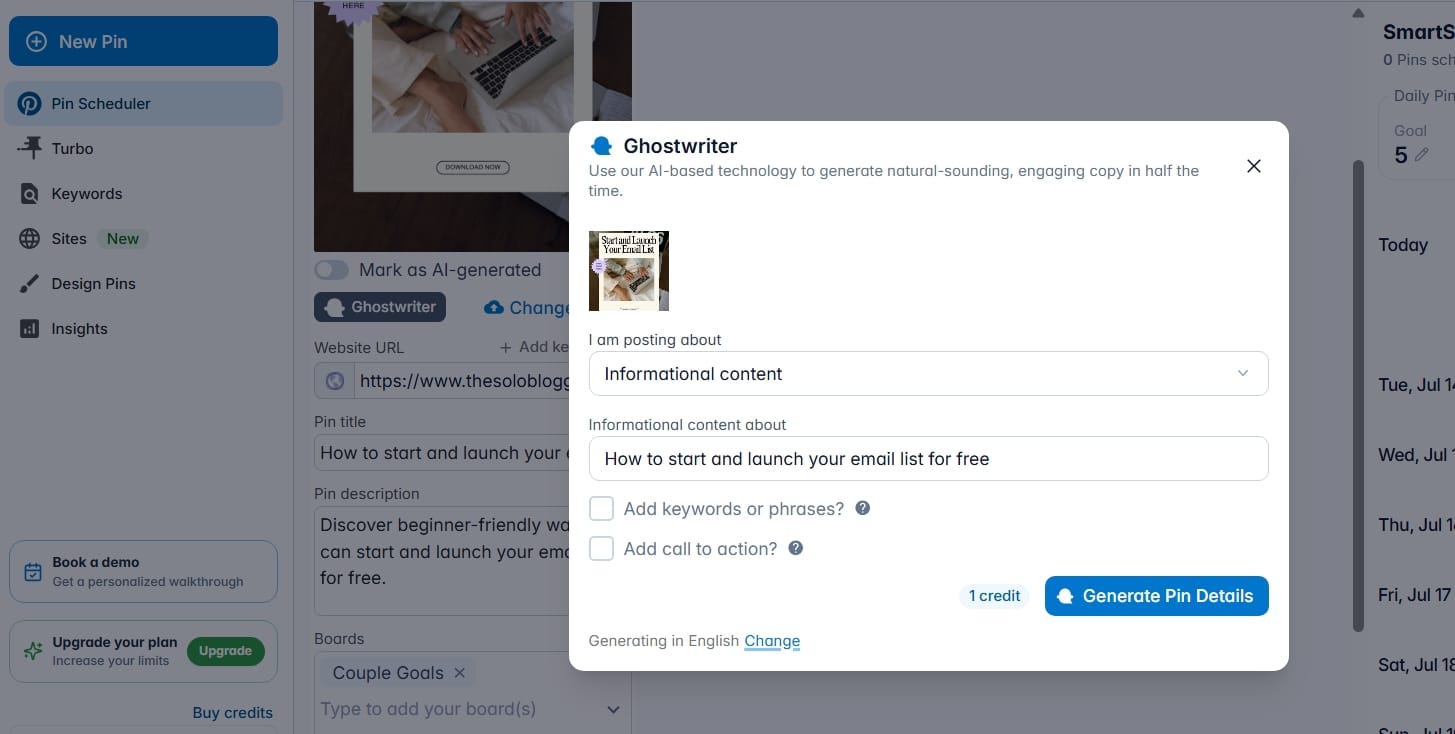
This can save a considerable amount of time when creating multiple Pins for the same article.
That said, I wouldn't recommend copying AI-generated text without reviewing it first. Always edit the output to match your voice and ensure it accurately reflects your content.
Practical Tips for Bloggers Using Tailwind
Here are a few habits worth adopting from the beginning:
- Don't rely on one Pin per blog post, create several variations with different headlines and graphics.
- Publish consistently instead of trying to flood Pinterest with dozens of Pins in one day.
- Use descriptive file names, titles, and descriptions that naturally include keywords.
- Keep your branding recognizable so readers begin associating your Pins with your blog.
- Review your analytics regularly instead of guessing what works.
- Most importantly, remember that Tailwind is a tool and not a shortcut for massive traffic.
- It can automate publishing and save countless hours, but it can't replace valuable content.
Tailwind Pros and Cons
After spending time exploring Tailwind and using it, I can confidently say it's one of the best marketing tools available for Pinterest-focused bloggers. That doesn't mean it's perfect, though. Like every platform, it has strengths and limitations depending on how you plan to use it.
What I Like About Tailwind
The biggest advantage of Tailwind is the amount of time it saves.
As bloggers, we already have enough responsibilities. We research topics, write articles, optimize them for search engines, create images, answer emails, update old content, and manage multiple marketing channels. Anything that helps reduce repetitive work without sacrificing quality should be considered.
I also appreciate how beginner-friendly the platform feels. The interface is clean, the navigation is intuitive, and most features are easy to understand without watching hours of tutorials. Even if you've never used a scheduling tool before, you'll likely feel comfortable after your first session.
Another standout feature is Tailwind Create which help speed up that workflow by generating multiple design variations that you can customize to match your branding. It doesn't replace your creativity, but it certainly reduces the amount of repetitive work involved.
Where Tailwind Could Improve
Although Tailwind excels at Pinterest marketing, its Instagram features aren't quite as comprehensive as some platforms dedicated solely to Instagram. If Instagram is your primary marketing channel, there may be alternatives with more advanced engagement tools like Metricool.
Another consideration is that Tailwind isn't a replacement for good content. Scheduling hundreds of Pins won't automatically generate traffic if the articles you're promoting don't solve real problems or provide value. Tailwind amplifies good content; it doesn't create success on its own.
Some of the more advanced AI capabilities and higher publishing limits are also reserved for paid plans. While the free plan is excellent for learning the platform, growing blogs will eventually benefit from upgrading.
Overall, these limitations are relatively minor and don't significantly reduce the platform's value for bloggers focused on Pinterest growth.
Tailwind vs Other Social Media Scheduling Tools
Choosing a scheduling platform depends on where your audience spends their time. Some tools focus on managing every social network, while others specialize in helping creators grow on specific platforms.
For bloggers, Tailwind's Pinterest-first approach gives it a unique advantage.
| Feature | Tailwind | Buffer | Later | Metricool |
|---|---|---|---|---|
| Best For | Pinterest & bloggers | General social scheduling | Instagram creators | Multi-platform marketing |
| Pinterest Scheduling | ✅ Excellent | ✅ Basic | ✅ Good | ✅ Good |
| Instagram Scheduling | ✅ Very Good | ✅ Excellent | ✅ Excellent | ✅ Excellent |
| AI Content Creation | ✅ Built-in | ✅ Available | Limited | Limited |
| Tailwind Create (Pin Designer) | ✅ Yes | ❌ No | ❌ No | ❌ No |
| SmartSchedule | ✅ Yes | Basic scheduling | Basic scheduling | Basic scheduling |
| Analytics | Excellent | Very Good | Very Good | Excellent |
| Content Calendar | ✅ Yes | ✅ Yes | ✅ Yes | ✅ Yes |
| Beginner Friendly | ⭐⭐⭐⭐⭐ | ⭐⭐⭐⭐☆ | ⭐⭐⭐⭐☆ | ⭐⭐⭐⭐☆ |
| Free Plan | ✅ Yes | ✅ Yes | ✅ Yes | ✅ Yes |
| Best Choice for Bloggers | ⭐⭐⭐⭐⭐ | ⭐⭐⭐⭐☆ | ⭐⭐⭐⭐☆ | ⭐⭐⭐⭐☆ |
If your goal is simply scheduling posts across several social media platforms, Metricool may be enough.
However, if Pinterest is a major part of your blogging strategy, Tailwind offers several specialized tools that the others simply don't provide. Features like Tailwind Create, SmartSchedule, and keyword research are designed specifically to help you get more value from Pinterest rather than treating it as just another social network.
If you're relying solely on Google for traffic, Tailwind can also help diversify your audience. Pinterest has introduced countless readers to blogs they may never have discovered through search engines alone.
Would I recommend it to every blogger?
Not necessarily. If you have no interest in Pinterest or Instagram, there are better tools available for your workflow.
But if Pinterest is part of your long-term growth strategy or you plan to make it one, I genuinely believe Tailwind is one of the best investments you can make.
It's easy to learn, enjoyable to use, packed with practical features, and saves hours of work every month.
My Rating: 4.8/5 ⭐
Best for: Bloggers, affiliate marketers, digital product creators, content creators, and small businesses looking to grow through Pinterest.
Frequently Asked Questions
Is Tailwind free to use?
Yes. Tailwind offers a free plan that allows you to explore the platform, schedule content, and try many of its core features before deciding whether to upgrade to a paid subscription.
Is Tailwind an official Pinterest Partner?
Yes. Tailwind is an official Pinterest Partner, meaning it integrates directly with Pinterest and follows the platform's publishing guidelines for scheduling content safely.
Does Tailwind guarantee more Pinterest traffic?
No. Tailwind doesn't guarantee traffic because your results still depend on the quality of your content, your Pin designs, your keywords, and your overall Pinterest strategy. What Tailwind does provide is the consistency and efficiency needed to give your content a better chance of being discovered.
Is Tailwind better than Buffer?
For Pinterest marketing, yes. Tailwind offers Pinterest-specific features that Buffer doesn't provide.
Does Tailwind work for affiliate marketing?
Yes. Many affiliate marketers use Tailwind to promote helpful blog posts, buying guides, product comparisons, and tutorials through Pinterest. Just make sure you follow Pinterest's latest affiliate link guidelines and focus on providing value rather than simply promoting products.
Is Tailwind worth paying for?
If you're publishing content consistently and Pinterest is driving traffic to your blog, I believe the paid plans are worthwhile.
In Conclusion,
Growing a successful blog isn't just about writing great articles. It's about making sure those articles continue reaching new readers long after they're published.
It helps transform Pinterest from a time-consuming daily task into a repeatable marketing system. By scheduling content in advance, creating multiple Pin designs, analyzing performance, and staying consistent, you can spend less time managing social media and more time creating the content your audience came for.
If you're serious about growing your blog through Pinterest, Tailwind is a platform I genuinely recommend trying.
If you haven't signed up to Tailwind yet, now is the time.
Read Next:
 Faye
Faye
 Faye
Faye
 Faye
Faye
 Faye
Faye
 Faye
Faye
 Faye
Faye
Free Resources:
 Faye
Faye
This blog runs on Ghost just in case if you're wondering.
Ghost is the blogging platform I personally use and recommend. It's very easy to use and gives you powerful search engine optimization features.
It's built for independent bloggers and comes with everything you need and nothing you don't.
You might also like

9 Best Membership Software for Bloggers Compared
Looking for a way to turn your blog into a paid community, newsletter, course, or membership? Here are 9 membership platforms worth considering, organized by the type of experience you want to build.

How to Get a Free Business Email for Your Blog
Want a professional email like hello@yourblog.com without spending a fortune? Here's how bloggers can set up a custom business email using their own domain.
Dub Review: How to Create Branded Affiliate Links for Free
Learn how to create cleaner, branded affiliate links with Dub, organize your links, track clicks, and manage your affiliate URLs from one place.